Quick answer
BYOD (Bring Your Own Device) means keeping your existing phone when you switch to a new carrier. The new carrier gives you a SIM card or eSIM — the phone stays the same.
For BYOD to work, your phone needs to pass two checks: it must be unlocked (eligible to use on another carrier's network) and compatible with the new carrier's network bands. Both are easy to verify before you commit to anything.
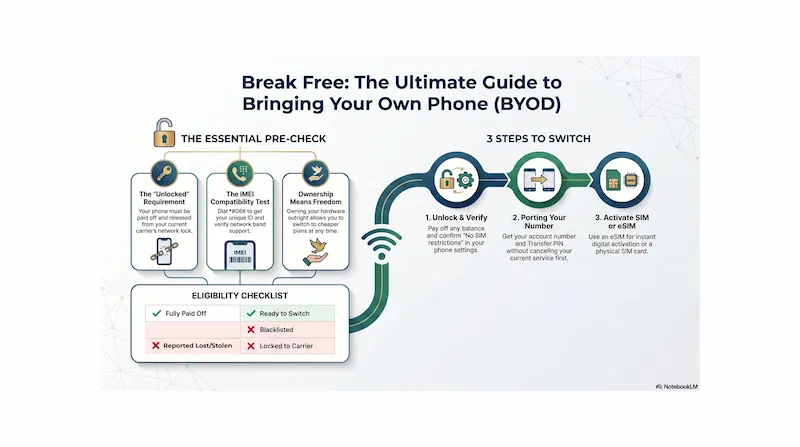
Infographic generated via NotebookLM from official carrier policy sources. Analysis by SwitchNinja Staff.
What BYOD means in plain English
When you sign up for a plan at Verizon, AT&T, or T-Mobile, they'll often try to sell you a new phone — or put you on a financing deal for one. BYOD is the alternative: skip the new device entirely, bring the phone you already own, and just pay for the plan.
In practice, this usually means the new carrier ships you a physical SIM card or activates an eSIM digitally, and you're on their network within minutes. The device itself doesn't change — same phone, same apps, same photos. Just a different carrier.
Why it matters
Buying a new phone from a carrier often means signing up for 24–36 months of device payments — which locks you into that carrier for years. BYOD lets you switch to a cheaper plan (or a better deal) whenever you want, because you own the hardware outright. No golden handcuffs.
The two checks your phone must pass
Check 1 — Unlocked
Is your phone free to use on another network?
A locked phone is tied to one carrier's network — it typically won't work on another carrier until the original carrier unlocks it. Carriers lock phones to ensure customers finish paying off device financing before they leave. Once a phone is paid off and meets the carrier's unlock policy, you can request an unlock (often online) and it's typically processed within a few days.
Phones bought outright from Apple, Google, or Samsung directly are usually sold unlocked. If you bought your phone from a carrier store on a payment plan, it's almost certainly locked until the balance is paid. What is an unlocked phone? →
Check 2 — Compatible
Does your phone support the new carrier's network?
Being unlocked isn't enough on its own. Your phone's hardware also needs to support the specific LTE and 5G bands the new carrier uses. Many recent flagship phones work across all major US carriers — but compatibility still depends on the exact model variant, and some phones may be missing specific bands that affect 5G or coverage in certain areas. Older phones, budget models, or phones bought for other countries may be missing key bands — which can mean slower speeds, weaker coverage, or no 5G in certain areas.
Compatibility is checked by model number, not just brand. The easiest way to confirm is the IMEI check below.
How to check if your phone is unlocked
iPhone
Settings → General → About → scroll to Carrier Lock. If it says "No SIM restrictions" — you're unlocked and ready to BYOD.
Android
Settings → Connections (or Network & Internet) → look for SIM or network unlock status. Exact labels vary by manufacturer. Alternatively, insert a SIM from a different carrier — if you get signal and can make a call, the phone is unlocked.
Quick test: Borrow a friend's SIM from a different carrier and insert it into your phone. If you see signal bars and can make a call, the phone is unlocked. If you see an error message asking for an unlock code, it's still locked.
What an IMEI check is — and why you should run one
Every phone has an IMEI — a unique 15-digit device ID that carriers use to identify your specific phone on their system. Running an IMEI check with the new carrier can reveal whether your phone is compatible with their network, blacklisted (lost or stolen), or blocked. Not every checker reports unlock or payment status, so it's worth confirming those separately through your current carrier if you're not sure.
How to find your IMEI
› Easiest: Dial *#06# from your phone's keypad — the IMEI appears on screen immediately
› iPhone: Settings → General → About → scroll to IMEI
› Android: Settings → About Phone → Status → IMEI (exact path varies by manufacturer)
› iPhone box or SIM tray: The IMEI is printed on the original box and sometimes the SIM tray
Once you have the IMEI, enter it into the new carrier's BYOD compatibility checker — every major carrier and most MVNOs have one on their website. It takes about 30 seconds and tells you definitively whether your phone will work on their network before you buy anything.
When you can — and can't — BYOD
You can BYOD if...
✓ Phone is fully paid off
✓ Phone is unlocked (or you've requested an unlock)
✓ Phone passes the new carrier's IMEI check
✓ Phone supports the carrier's key network bands
✓ Phone is not reported lost or stolen
You can't BYOD if...
✗ You still owe money on a device payment plan
✗ Your current carrier hasn't processed the unlock yet
✗ Phone is reported lost or stolen (blacklisted)
✗ Phone hardware is incompatible with the new network
5 steps to bring your phone to a new carrier
Confirm your phone is paid off and unlocked
Check the Carrier Lock setting on your phone. If it's still locked, pay off the remaining balance and submit an unlock request to your current carrier. Unlock timing varies by carrier — some require a waiting period after payoff, others process requests within a few days.
Run the IMEI check on the new carrier's website
Every major carrier and MVNO has a free BYOD or compatibility checker. Enter your IMEI (dial *#06#) and confirm your phone is compatible before you pick a plan. This takes about 30 seconds.
Get your account number and transfer PIN from your current carrier
If you want to keep your phone number, do NOT cancel your current service yet. Log into your account or call your carrier to get your account number and number transfer PIN (sometimes called a port-out PIN). You'll need both to bring your number with you. How porting your number works →
Choose a plan and get your SIM or eSIM
Select your new plan and decide between a physical SIM (mailed to you, usually arrives in 2–5 days) or an eSIM (downloaded directly to your phone in minutes if your device supports it). Most phones from 2019 onward support eSIM. What is eSIM? →
Activate and test — your old account cancels itself
Follow the new carrier's activation steps (usually through their app or website). Once the number port completes, your old line usually closes — but billing and final account closure procedures vary by carrier. Test calls, texts, and mobile data to confirm everything is working before you remove the old SIM.
⚡ The Bottom Line
If you own your phone, you have the power to shop for the lowest plan price — no carrier can hold you hostage.
BYOD removes the biggest financial barrier to switching carriers. When you own your phone outright, you can compare plan prices across every carrier and move to a better deal without device payments holding you back. The two checks to start with: is the phone unlocked, and does it pass the new carrier's IMEI check?
If your phone is still on a payment plan, finish paying it off and request the unlock — then the door is open. Most modern smartphones work seamlessly across all major US carriers once unlocked.
Frequently asked questions
What does BYOD mean for cell phone plans?▼
In the cell phone carrier context, BYOD (Bring Your Own Device) means keeping your existing phone and activating it on a new carrier instead of buying a new device. The new carrier provides a SIM card or eSIM for their network, but the phone itself stays the same. BYOD is only possible if your phone is unlocked and compatible with the new carrier's network.
How do I know if my phone is unlocked?▼
On iPhone, go to Settings → General → About → Carrier Lock. If it says "No SIM restrictions," your phone is unlocked. On Android, the exact path varies by manufacturer, but you can generally find it under Settings → Connections or Network & Internet → look for SIM or network unlock status. You can also test it by inserting a SIM from a different carrier — if you get signal and can make a call, it's unlocked.
Can I BYOD if I still owe money on my phone?▼
Usually not. If you're still paying off your phone through a carrier financing plan, the carrier typically keeps the phone locked to their network until the balance is paid in full. Once the device is paid off and you meet the carrier's unlock policy, you can request an unlock and then BYOD to a new carrier. Some carriers unlock automatically after a set period; others require a formal unlock request.
What is an IMEI check?▼
An IMEI (International Mobile Equipment Identity) is a unique 15-digit number that identifies your specific device. Carriers use IMEI checks to confirm whether your phone is compatible with their network, unlocked, paid off, and not reported lost or stolen. To find your IMEI, dial *#06# from your phone's keypad, or look in your phone's settings. Most carriers have a free BYOD checker on their website where you enter the IMEI to confirm compatibility before you switch.
Ready to BYOD? See our T-Mobile vs AT&T comparison or read the Mint Mobile review — no device financing required.