Quick answer
To port your number: sign up with your new carrier, give them your current account number and transfer PIN, and they handle the transfer. Do not cancel your old plan first — your old account must stay active until the port completes. Many mobile-to-mobile ports finish in under 30 minutes, though timing varies.
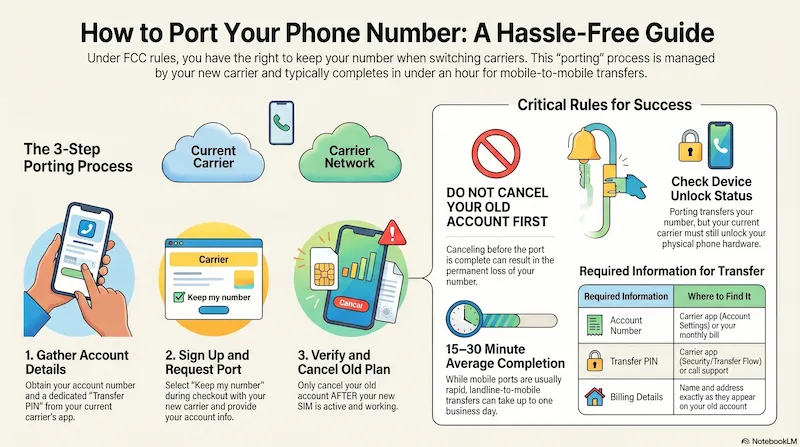
Visual summary created with NotebookLM · Research and analysis by SwitchNinja Staff.
What is porting?
Porting is the process of transferring your existing phone number from one carrier to another. It's governed by the FCC's Local Number Portability (LNP) rules — carriers are required to process valid port requests, and most simple mobile-to-mobile ports complete well within one business day. More complex ports (such as landline-to-mobile) may take longer.
You can port from any carrier to any other carrier. You can port a landline number to a mobile carrier. You can port from prepaid to postpaid or vice versa. The number can usually be transferred independently of the old account.
Step-by-step: how to port your number
Get your account number and PIN from your current carrier
Log in to your current carrier's app or website — Verizon, AT&T, and T-Mobile all have dedicated transfer-PIN or number-transfer flows that are usually the fastest path. If you can't find it there, contact support. This is different from your phone's unlock PIN.
Sign up with your new carrier and select "Keep my number"
During checkout, choose to transfer your existing number instead of getting a new one. You'll need your account number, PIN, and the name and billing address on your current carrier's account.
Wait for the port to complete — usually minutes to a few hours
Your new carrier submits the port request. Many mobile-to-mobile ports finish in 15–30 minutes, though some take a few hours. You'll get confirmation when done. Your old line typically deactivates when the port completes.
Cancel your old plan after the port is done
Once your new SIM is active and your number is working, then cancel your old account. If you cancel first, you may lose your number permanently.
Critical: don't cancel first
This is the most common porting mistake. If you cancel your old account before the port completes, your number can be lost permanently. Your old account must stay active until your new carrier confirms the port is done.
What you need before you start
| Required Info | Where to Find It |
|---|---|
| Your current phone number | Settings → Phone (iPhone) or About Phone (Android) |
| Account number | Carrier app → Account Settings, or on your bill |
| Transfer PIN | Carrier app → Security, or call customer service |
| Billing name on account | Exactly as it appears on your current carrier's account |
| Billing address on account | Exactly as it appears on your current carrier's account |
How long does porting take?
Usually 15–30 minutes. Sometimes instant, sometimes a few hours.
Up to 1 business day. Older landline infrastructure is slower to process.
Contact your new carrier — they handle the request and can check status. Most delays are caused by mismatched account info (wrong PIN or billing name).
Make sure your phone is unlocked
Porting transfers your number — not your phone's compatibility. If your phone was bought through a carrier, it may be locked to that network. Unlock eligibility depends on your carrier's policy and whether your device has met the required conditions — contact your current carrier to check your device's unlock status before switching.
What happens to your old plan after porting?
When the port completes, your old carrier automatically terminates the ported line. You may still owe for the current billing cycle — carriers generally don't prorate final bills unless your contract says otherwise.
Check for early termination fees if you're under contract. If you received a phone subsidy or installment plan, you may still owe the remaining device balance even after porting.
Porting within a family plan
Porting a line off a family plan works the same way — but it requires the account holder's cooperation. The account holder may need to authorize the port or contact the carrier to release the line.
Also plan ahead: the remaining lines may lose their multi-line discount if dropping below the discount threshold.
Frequently asked questions
Does porting cost anything? ▼
Will I lose service during the port? ▼
Can I port a number from a prepaid plan? ▼
What if my port gets rejected? ▼
Bottom line
Porting is easy as long as you don't cancel first. Get your account number and PIN, sign up with your new carrier, select "keep my number," and let them handle the rest. Most ports complete in under an hour. Your number is yours — take it with you.
Related
More from the Learn Center
Ready to Switch?
Find Your Best Plan Before You Port
Answer 5 quick questions and we'll match you to the right carrier before you commit to anything.
Find My Perfect Plan →Choosing where to port? See our T-Mobile vs AT&T comparison or read the T-Mobile review.