Quick answer
eSIM (embedded SIM) is a digital SIM profile stored in embedded hardware inside your phone. Instead of inserting a small plastic card to connect to a carrier, you scan a QR code or use a carrier app and your plan activates in minutes — no mail, no store visit, no tiny card to lose.
Once activated, it usually performs the same as a physical SIM on the network — same signal, same coverage. The main difference is how you set it up and that you can switch carriers or add a second line without touching any hardware.
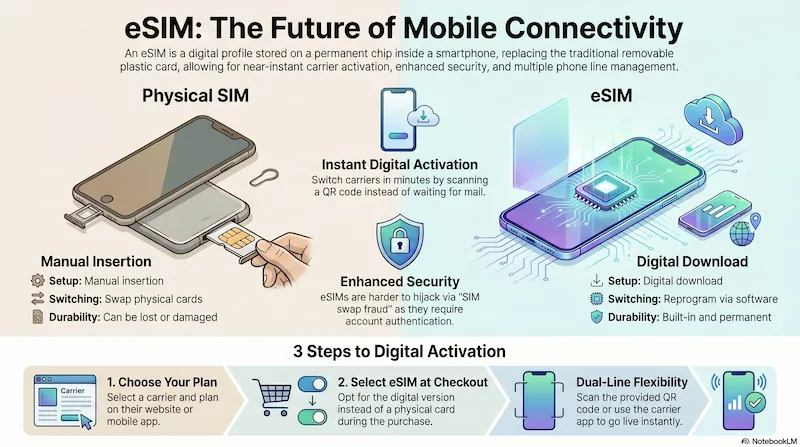
Visual summary created with NotebookLM · Research and analysis by SwitchNinja Staff.
Physical SIM vs. eSIM — what actually changed
A traditional SIM card is a small chip you physically insert into your phone. It stores your carrier identity — who you are on the network. To switch carriers, you swap the card. To get a card, you either visit a store or wait for one to arrive in the mail.
An eSIM does the same job but the chip is soldered directly into your phone's motherboard at the factory. It can't be removed — but it can be reprogrammed. You download a carrier profile onto it digitally, and your phone connects to that network. Delete that profile and add a new one, and you've effectively "switched SIM cards" without touching anything physical.
| Physical SIM | eSIM | |
|---|---|---|
| Activation | Insert card, wait for service | Scan QR code, active in minutes |
| Switching carriers | Get new card, swap it in | Download new profile digitally |
| Two lines (dual SIM) | Requires second SIM slot | eSIM + physical SIM at same time |
| Lost/damaged | Need replacement card | Can't be lost — built into phone |
| Signal / coverage | Identical | Identical |
| Old phones | Works on all phones | Requires eSIM-capable hardware |
Does your phone support eSIM?
Many phones sold since 2020 support eSIM, but compatibility varies by exact model, region, and carrier. Here's a general reference:
eSIM compatibility by phone:
- iPhone 14 and newer (US models): eSIM only — no physical SIM slot
- iPhone XS, XR, 11, 12, 13: eSIM + physical SIM (dual SIM capable)
- Samsung Galaxy (many recent models): eSIM supported on many models, but varies by region and exact model — check your device specs
- Google Pixel (many recent models): eSIM supported on many Pixel models — verify your specific model before purchasing
- Older phones (pre-2019): Physical SIM only — eSIM typically not available
Always confirm eSIM support for your specific model and carrier before purchasing a plan — search "[your phone model] eSIM support" to find official specs.
Which carriers support eSIM?
The carriers SwitchNinja tracks generally support eSIM, but activation methods vary by carrier and device — some use a QR code, some use an app, and some support in-store setup as well:
| Carrier | eSIM Support | Notes |
|---|---|---|
| Verizon | ✓ Supported | Activate via My Verizon app or website |
| AT&T | ✓ Supported | Activate via myAT&T app or in-store |
| T-Mobile | ✓ Supported | Activate via T-Mobile app or online |
| Visible | ✓ Supported | eSIM-first — fastest activation of any carrier |
| Metro by T-Mobile | ✓ Supported | BYOP eSIM transfers supported |
| Cricket Wireless | ✓ Supported | Activate via Cricket app or QR code |
| Mint Mobile | ✓ Supported | eSIM available — no physical SIM wait |
| Straight Talk | ✓ Supported | Select compatible devices only |
| US Mobile | ✓ Supported | eSIM available on all 3 networks (Warp, LightSpeed, Dark Star) |
| Tello | ✓ Supported | eSIM activation via Tello app |
Always confirm eSIM compatibility with your specific phone model before purchasing a plan.
How do you activate an eSIM?
The process varies slightly by carrier, but generally looks like this:
1. Sign up for a plan online. Choose your carrier and plan on their website or app.
2. Choose eSIM when asked. Most carriers ask "physical SIM or eSIM?" during checkout. Pick eSIM.
3. Scan the QR code or use the carrier app. Depending on the carrier, you'll either scan a QR code they email you or complete setup through their app. On iPhone, the typical path is Settings → Cellular → Add eSIM. On Android, the menu path varies by manufacturer.
4. You're live. The carrier profile downloads, your phone connects to the network, and your plan is active — usually within a few minutes.
Who benefits most from eSIM?
Add a local carrier plan when you land abroad without swapping cards or losing your home number. Run two plans simultaneously — your home number on one, local data on the other.
No waiting for a SIM in the mail. Sign up, scan a code, and you're on a new carrier the same day. Makes trying Mint or Visible essentially risk-free — if you don't like it, switching back takes minutes.
Keep a personal and work number on one phone without carrying two devices.
Your phone is older (pre-2019) and doesn't support eSIM, or you prefer keeping a physical backup SIM when traveling to areas with spotty coverage.
Frequently asked questions
Can I switch back to a physical SIM after using eSIM? ▼
What happens to my eSIM if I get a new phone? ▼
Is eSIM more secure than a physical SIM? ▼
Can I have multiple eSIM profiles stored? ▼
Does eSIM cost extra? ▼
⚡ The Bottom Line
If your phone and carrier support eSIM, it's usually the fastest and most convenient way to activate service.
eSIM is faster to activate, impossible to physically lose, and more secure against SIM swap fraud. It's especially useful for international travelers, people who switch carriers often, and anyone who wants dual-SIM flexibility. Just confirm your specific device and carrier support it before committing.
Ready to switch via eSIM? Read the Visible review — one of the easiest eSIM activations available.