Quick answer
Go directly to each carrier's official coverage map and search your home address, work address, and any places you travel frequently. Look specifically for 5G and LTE coverage — not just "coverage" which may include slow extended network.
One of the most reliable tests: ask someone who already uses that carrier in your area. Coverage maps show approximate outdoor signal projections — they are not a guarantee of indoor coverage, speed, or real-world performance. A neighbor or coworker on the same carrier is more accurate than any map.
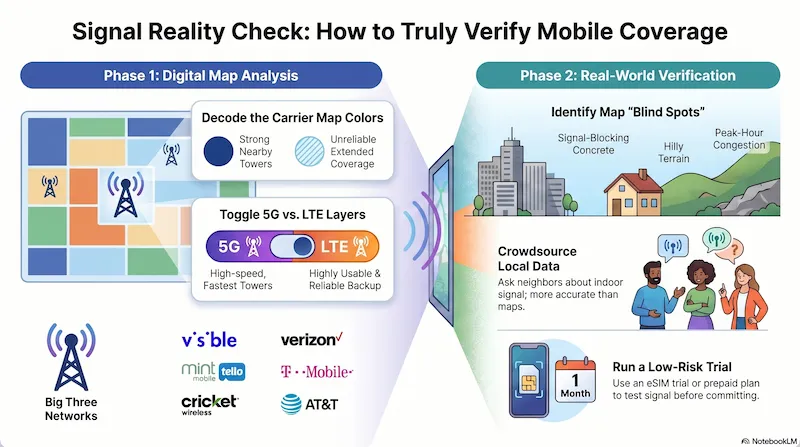
Infographic generated via NotebookLM from official carrier policy sources. Analysis by SwitchNinja Staff.
Step 1 — Check the carrier's official coverage map
Every carrier publishes a coverage map. Enter your address and look at the result — but pay close attention to what the colors mean. Most carriers use multiple shading levels that represent very different experiences.
| Carrier | Coverage Map URL | Network |
|---|---|---|
| Verizon | verizon.com/coverage-map | Verizon |
| AT&T | att.com/maps/wireless-coverage-map | AT&T |
| T-Mobile | t-mobile.com/coverage/coverage-map | T-Mobile |
| Visible | verizon.com/coverage-map — Visible runs on Verizon's network | Verizon |
| Mint Mobile | mintmobile.com/coverage — check T-Mobile's underlying network | T-Mobile |
| Cricket | cricketwireless.com/coverage — check AT&T's underlying network | AT&T |
| US Mobile | usmobile.com/coverage — select the specific network for your plan | Verizon / T-Mobile / AT&T |
| Tello | tello.com/coverage — check T-Mobile's underlying network | T-Mobile |
MVNOs usually rely on the same underlying network as their parent carrier
Mint Mobile, Tello, and Metro run on T-Mobile's network. Cricket runs on AT&T's network. Visible runs on Verizon's network. Straight Talk uses Verizon, T-Mobile, or AT&T depending on the SIM — check which network your specific plan uses before pulling a map. In most cases, checking the parent carrier's map is enough to assess geographic coverage. That said, plan-level priority during congestion, device compatibility, and any roaming arrangements can still affect real-world experience — so the map is a starting point, not a guarantee.
Step 2 — Understand what the map colors actually mean
Coverage maps use color shading to show signal strength — but carriers don't all define their colors the same way. A few things to look for:
Solid color means the carrier has strong signal from a nearby tower. This is what you want for your home and work locations.
May indicate a partner network, reduced speeds, or 5G on a different layer. Check the map's legend — lighter shading generally means less reliable signal.
If you live near a coverage boundary, indoor signal may be weaker than the map suggests.
Most maps let you toggle between 5G and LTE views. If 5G isn't in your area, LTE handles streaming, navigation, and email just fine. Don't rule out a carrier solely because its 5G footprint is smaller.
Step 3 — What coverage maps don't show you
Maps show outdoor signal projections based on tower locations. They don't account for:
Concrete, metal, and Low-E glass windows significantly weaken indoor signal. A solid-looking map location may have poor indoor coverage in thick-walled buildings.
Hills, valleys, and dense forest block signal. In rural or mountainous areas, real-world coverage can be significantly worse than the map shows.
Maps show coverage — not speed. A tower may cover your area but serve thousands of users. Peak-hour speeds can be much slower than what the map implies.
Basements and parking structures almost always have poor signal regardless of what the map shows above ground.
Step 4 — The best way to actually test coverage
Maps are a starting point — not a guarantee. Here are more reliable ways to verify before you commit:
A coworker, neighbor, or friend on the same carrier at the same locations is the most accurate real-world data point you can get.
Visible, Mint, and US Mobile all offer low-risk first months. With eSIM you can even run a trial plan alongside your current plan on dual-SIM capable phones — test signal at your key locations for a week before committing.
r/NoContract, r/Visible, r/MintMobile, and r/USMobile have real users sharing coverage experiences in specific cities and neighborhoods. Search your city + the carrier name.
Frequently asked questions
Which carrier has the best coverage overall? ▼
Do MVNOs have worse coverage than the main carrier? ▼
Is there a third-party tool to compare coverage maps? ▼
What if I live in a rural area? ▼
⚡ The Bottom Line
Check the map, then verify with a real person or a trial month.
Coverage maps are a useful first filter — if a carrier shows no coverage in your area, don't bother. But if the map looks good, validate it with someone who actually uses that carrier nearby, or sign up for a low-risk trial month with eSIM. The map tells you what's possible. Real-world testing tells you what you'll actually experience.
Once you've checked coverage, compare your options: read the Verizon review or the T-Mobile review.