Quick answer
iPhone: Settings → General → About → Carrier Lock. If it says "No SIM restrictions," you're unlocked.
Android: Insert a SIM from a different carrier. If it connects, you're unlocked. If it says "SIM not supported," you're locked.
If you're locked: contact your carrier to request an unlock. It's free if you meet the eligibility requirements below.
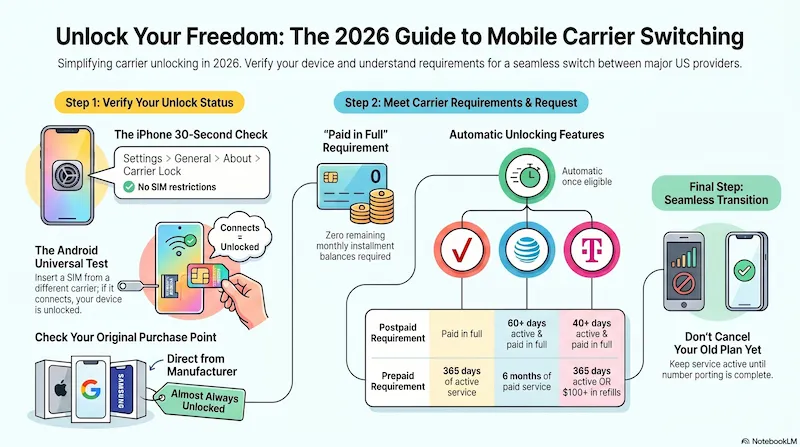
Visual summary created with NotebookLM · Research and analysis by SwitchNinja Staff.
How to check on iPhone
Apple made this easy — the unlock status is visible directly in your settings without needing to call anyone.
- Open Settings
- Tap General
- Tap About
- Scroll down to Carrier Lock
How to check on Android
Android varies by manufacturer. Here are the fastest methods.
Samsung (released after September 1, 2025)
Settings → Connections → More connection settings → look for Network lock status.
Samsung (released before September 1, 2025)
Settings → About phone → Software information → look at Service provider software version. If it ends in ATT/ATT exactly, the device was originally from AT&T and may need unlocking. If it contains ATT but ends in something else, it's already unlocked.
All Android phones — the universal test
Insert a SIM card from a different carrier. If the phone connects and shows signal, it's unlocked. If you get a "SIM not supported," "SIM not valid," or "Enter unlock code" message, it's locked.
Note: If you bought your phone directly from Apple, Google, or Samsung (not through a carrier), it's almost certainly already unlocked. Carrier locks only apply to phones purchased through or financed by a specific carrier.
2026 unlock policies by carrier
If your phone is locked, here's what each carrier requires before they'll unlock it. Policies are as of May 2026 — verify current terms with your carrier before requesting.
| Carrier | Postpaid requirement | Prepaid requirement | Automatic? |
|---|---|---|---|
| Verizon | Device paid in full. Gift card payoff adds a 35-day delay. | 365 days of paid, active service | Yes (postpaid) |
| AT&T | 60+ days active, device paid in full, account in good standing | 6 months of paid service | Auto for Apple/Samsung/Google — request needed for others |
| T-Mobile | 40 days active on the line, device paid in full | 365 days since activation — OR — $100+ in refills (min. 14 days since purchase). Max 2 unlocks per line per 12 months. | Yes — within 2 business days |
All three carriers unlock eligible devices for free. "Paid in full" means no remaining monthly installment balance — not just that you paid something at purchase. Devices reported lost or stolen will not be unlocked. Military personnel with deployment orders may qualify for expedited unlocking — contact your carrier directly. Source: Verizon (updated Feb 2026), AT&T (updated Mar 2026), T-Mobile (current policy).
How to request an unlock
Verizon
Unlocks automatically once the device balance is paid off — no action needed in most cases. If it doesn't unlock within a day, contact Verizon support or visit a store.
AT&T
Submit a request through AT&T's unlock portal at att.com/deviceunlock. You'll receive an email or text with unlock instructions — typically within a few minutes to 48 hours. Prepaid iPhones use the same portal; prepaid Android devices use the AT&T Device Unlock app.
T-Mobile
T-Mobile unlocks automatically and remotely within 2 business days once your device becomes eligible — no request needed if your phone supports remote unlock. Check your unlock status in your my T-Mobile account. Note: T-Mobile limits unlocks to 2 per line per 12-month period on prepaid plans.
What to do after your phone is unlocked
Once your phone is unlocked, switching carriers is straightforward:
- Choose your new carrier and plan — take the SwitchNinja quiz if you're not sure which plan fits your usage
- Start activation with the new carrier — have your account number and PIN from your current carrier ready for the number port
- Do not cancel your current plan first — the port transfers your number automatically and cancels the old account
- Insert the new SIM (or activate eSIM) and follow the carrier's setup steps
See our number porting guide and full carrier switching guide for step-by-step instructions.
Frequently asked questions
How do I check if my phone is unlocked? ▼
Can I unlock my phone for free? ▼
Will unlocking affect my current service? ▼
My phone says it's locked — what are my options? ▼
Does an unlocked phone work on any carrier? ▼
⚡ The Bottom Line
30 seconds to check. Free to unlock. No reason to stay on a plan that's overcharging you.
If your phone is unlocked — or once it is — you can switch to a plan that actually fits your usage. US Mobile, Visible, and Mint Mobile all run on the same towers as the big three at a fraction of the price. The quiz below takes 60 seconds to find your best match.
Phone unlocked? Compare your options: read the US Mobile review or the Mint Mobile review.