Quick answer
Wi-Fi calling is a feature that routes phone calls and text messages over your Wi-Fi internet connection when cellular signal is weak or unavailable. Your phone number stays the same — the person you're calling doesn't know the difference.
It usually costs nothing extra, is built into most modern phones, and is supported by the carriers SwitchNinja tracks on compatible devices. You don't need a special app — it works through your regular phone dialer. You just need to turn it on in your phone's settings once.
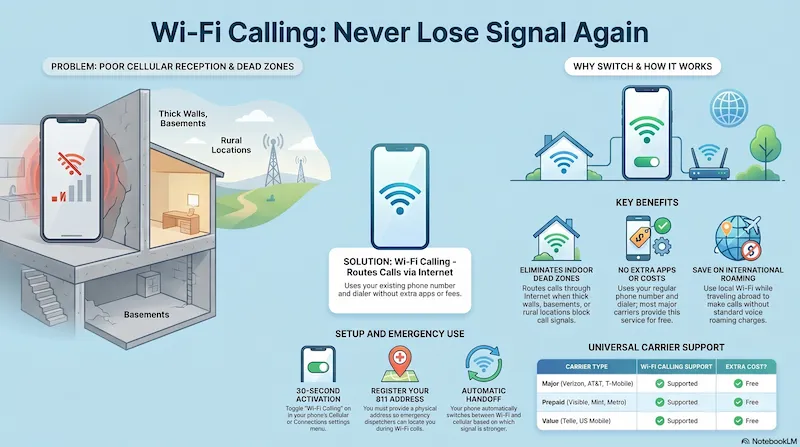
Infographic generated via NotebookLM from official carrier policy sources. Analysis by SwitchNinja Staff.
How Wi-Fi calling works
Normally, when you make a call, your phone connects to a nearby cell tower and the voice data travels over the carrier's cellular network. With Wi-Fi calling enabled, your phone instead sends voice data over your Wi-Fi router to the internet, where it connects to your carrier's network and routes the call normally from there.
From the recipient's perspective — and for 911 dispatch — the call looks identical to a normal cellular call. Your caller ID shows your regular number. You can call any phone number, not just other Wi-Fi calling users.
Your phone usually switches between cellular and Wi-Fi calling automatically when signal is weak — though handoff behavior can vary by carrier, device, and network conditions. In most cases, if you have Wi-Fi calling enabled and you're on a strong Wi-Fi network, your phone will prefer Wi-Fi calling without you doing anything.
When Wi-Fi calling actually helps
Weak Signal at Home or Work
Old buildings, basements, and offices with thick walls often have poor cell signal. Wi-Fi calling can significantly improve reliability indoors — as long as your Wi-Fi connection is solid.
International Travel
Make and receive calls on your US number over hotel or local Wi-Fi abroad — often avoiding voice roaming charges. Combine with airplane mode to prevent roaming data charges on cellular.
Rural Areas with Poor Coverage
If you have home internet but spotty cell signal, Wi-Fi calling can provide more reliable indoor phone service where towers are distant or overloaded.
Underground & Blocked Locations
Parking garages, basements, and subway platforms block cell signal. If Wi-Fi is available, Wi-Fi calling often works where cellular can't reach.
Which carriers support Wi-Fi calling?
Most major carriers and many prepaid brands support Wi-Fi calling on compatible devices at no extra charge. Here's the status for carriers SwitchNinja tracks — support can vary by specific device and plan, so verify with your carrier if you're unsure:
| Carrier | Wi-Fi Calling | Extra cost? |
|---|---|---|
| Verizon | ✓ Supported | Free |
| AT&T | ✓ Supported | Free |
| T-Mobile | ✓ Supported | Free |
| Visible | ✓ Supported | Free |
| Metro by T-Mobile | ✓ Supported | Free |
| Cricket Wireless | ✓ Supported | Free |
| Mint Mobile | ✓ Supported | Free |
| Straight Talk | ✓ Supported | Free |
| US Mobile | ✓ Supported | Free |
| Tello | ✓ Supported | Free |
How to turn on Wi-Fi calling
It takes about 30 seconds to enable. Steps vary slightly by phone:
iPhone
Settings → Cellular → Wi-Fi Calling → toggle on. You may be asked to confirm your address for 911 purposes.
Android (Samsung)
Settings → Connections → Mobile Networks → Wi-Fi Calling → toggle on.
Android (Pixel)
Phone app → three-dot menu → Settings → Calls → Wi-Fi calling → toggle on.
Once enabled, you'll see a small Wi-Fi icon near your signal bars when Wi-Fi calling is active. Your phone handles switching automatically.
Frequently asked questions
Does Wi-Fi calling use my cellular data? ▼
Is Wi-Fi calling the same as FaceTime or Zoom? ▼
Can I receive calls on Wi-Fi calling when I have no cell signal? ▼
Does 911 work with Wi-Fi calling? ▼
Will it work on any Wi-Fi network, or just my home network? ▼
⚡ The Bottom Line
A simple feature worth enabling before you need it.
Wi-Fi calling is one of the most practical features most people never bother to enable. It usually costs nothing extra, requires no special app, and can improve calling reliability in weak-signal areas — indoors, in rural locations, and when traveling internationally. Enable it now on compatible devices, confirm your 911 address is registered, and it works quietly in the background when you need it.
Choosing a carrier with strong Wi-Fi calling support? See our T-Mobile vs AT&T comparison or read the T-Mobile review.