This guide is for informational purposes. Carrier policies, pricing, and promotions change — verify details at verizon.com and mintmobile.com before switching. SwitchNinja is not responsible for any service interruption, billing charges, or forfeited credits. See our Terms of Use.
Quick answer
Switching from Verizon to Mint Mobile can save $35–$50/mo on a single line. The process takes 15–30 minutes and your number comes with you. The two things most people miss: checking whether Verizon trade-in credits will be forfeited and turning off Verizon Number Lock before submitting the port. Get those two right and the rest is straightforward.
The main trade-off: Mint runs on the T-Mobile network, not Verizon's. In strong T-Mobile coverage areas the service is excellent. In rural areas where T-Mobile is weaker than Verizon, you'll feel the difference.
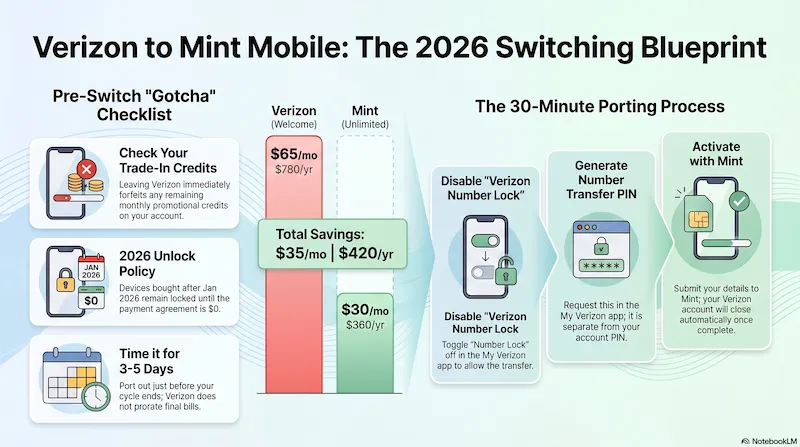
Visual summary created with NotebookLM · Research and analysis by SwitchNinja Staff.
🆕 Current Offer — Verizon Switchers
$25 renewal credit when you port from Verizon
Mint Mobile is currently offering a $25 credit applied to your first renewal when you bring your number from Verizon (or AT&T). Requires port-in; credit applies within 15 days of activation. Offer expires 12/31/26. Taxes and fees are extra. Not combinable with all other offers — verify current terms at mintmobile.com before activating.
The savings math: Verizon vs Mint Mobile
Verizon's plans are postpaid and month-to-month. Mint pricing depends on how many months you prepay — new customers get an intro rate for the first 3 months, then choose a renewal option. Taxes and fees are extra on all plans.
Verizon (postpaid, 1 line, autopay)
| Plan | Data | Price/mo | Annual cost |
|---|---|---|---|
| Unlimited Welcome | Unlimited (deprioritized) | $55 | $660 |
| Unlimited Plus | Unlimited + 30GB hotspot | $70 | $840 |
| Unlimited Ultimate | Unlimited + 200GB hotspot | $85 | $1,020 |
Mint Mobile (prepaid, taxes & fees extra)
| Plan | Intro (first 3 mo) | 12-mo rate | 3-mo renewal |
|---|---|---|---|
| 5GB | $10/mo | $15/mo | $25/mo |
| 15GB | $15/mo | $20/mo | $35/mo |
| 20GB | $20/mo | $25/mo | $45/mo |
| Unlimited 50GB priority · 20GB hotspot |
$25/mo | $30/mo | $40/mo |
Mint intro rate is for new customers, first 3 months only. After intro, renew at the 12-month rate (cheapest) or 3-month rate (more flexible, costs more). Taxes and fees are extra — Mint adds a Recovery Fee plus government taxes at checkout. Prices verified May 2026 via Mint Mobile Broadband Facts labels.
Bottom-line savings: Verizon Welcome → Mint Unlimited
New customer intro: $55/mo → $25/mo = $30 saved per month for the first 3 months. After that, renew at the 12-month rate for an ongoing $55 → $30 = $25/mo saved, $300/year. The catch: Mint is prepaid and runs on T-Mobile's network, not Verizon's. If your area has solid T-Mobile coverage, the savings are hard to argue with.
Is Mint Mobile the right move for you?
The savings are real — but Mint isn't the right fit for everyone. Two questions to ask before you decide:
Switch if you…
- Live and work in a strong T-Mobile coverage area
- Use 15GB or less of data per month (5GB or 15GB plan)
- Can pay a year's service upfront
- Don't have active trade-in credits on your Verizon account
- Want the same T-Mobile network for less money
Wait (or skip) if you…
- Live in a rural area where T-Mobile is patchy
- Have Verizon trade-in promo credits still paying out
- Need month-to-month flexibility — Mint requires prepay
- Travel frequently to rural or international destinations
- Still owe money on a Verizon device payment plan
📍 Coverage tip before you commit
Mint uses T-Mobile's network, but as an MVNO it sits below T-Mobile postpaid customers in priority during network congestion. Check T-Mobile's coverage map for your home, work, and regular travel routes. If T-Mobile shows strong 5G or LTE in those areas, Mint's coverage will generally be solid. If coverage looks thin, Verizon may be worth the premium.
Before you switch: 4 things to check
Check 1
Is your Verizon phone unlocked?
Verizon's unlock rules depend on how your device was purchased. Here's what applies:
- Postpaid device on a payment plan: Stays locked until the full device balance is paid off. No automatic unlock until balance is $0.
- Postpaid device purchased outright: Unlocks automatically — no waiting period.
- Paid off online, in the app, or with a gift card: 35-day unlock delay after payoff. To avoid the wait, pay the balance in person at a Verizon corporate store using cash or a chip-enabled card.
- Verizon Prepaid device: Remains locked for 365 days of paid, active service.
To check unlock status: iPhone → Settings → General → About (look for "No SIM Restrictions"). Android → Settings → Connections → Network unlock status. Once confirmed unlocked, you're clear to proceed.
Check 2 — Most important for Verizon customers
Do you have active trade-in promotional credits?
This is the most expensive mistake Verizon customers make when switching. If Verizon gave you a promotional credit — like "$800 off when you trade in your old phone" — that credit is paid out in monthly installments over 24–36 months. When you port out, those monthly credits stop immediately.
The math that hurts: If you have 18 months of $25/mo credits remaining ($450 total), those disappear the moment you leave. That $300/year in Mint savings could be wiped out in year one.
How to check: Log into My Verizon → Device Overview → look for "Promotional credit remaining" or a monthly credit line on your bill. If you see one, calculate the total remaining before deciding whether the switch makes financial sense right now.
Check 3
Disable Verizon Number Lock
Verizon has a security feature called Number Lock that blocks port-out requests — even if every piece of your account info is correct. In the My Verizon app, go to Account → Security → Number Lock and turn it off for the line(s) you're moving. If it's enabled when you try to port, the transfer will be rejected and you'll have to start over.
Check 4
Time your switch to avoid a wasted billing cycle
Verizon doesn't prorate your final bill. If you port out on day 3 of a new billing cycle, you've paid for 27 days you won't use. Aim to switch 3–5 days before your Verizon billing cycle ends. You can find your cycle end date in My Verizon under Billing.
How to switch: step-by-step
Step 1
Pay off your Verizon device (if financed)
If you're on a Verizon device payment plan, pay the remaining balance in full at my.verizon.com → Devices → Pay off device. Confirm the balance shows $0 before moving on. Do not pay with a Verizon Gift Card if you need to switch quickly — that method delays unlock by 35 days.
Step 2
Confirm the device is unlocked
Check unlock status in your phone's settings (see Check 1 above). If it shows locked or still processing, wait for confirmation before continuing. Trying to port a locked phone will fail and require a restart of the process.
Step 3
Turn off Verizon Number Lock
In the My Verizon app: Account → Security → Number Lock → toggle off. This takes effect immediately.
Step 4
Gather your Verizon account details
You'll need three things from Verizon:
- Account number — found on your monthly bill or in My Verizon under Account Overview
- Number Transfer PIN — generate it in the My Verizon app under Account → Transfer your number. This is different from your account security PIN — use the wrong one and the port will fail. Transfer PINs typically expire in 7 days, so generate it when you're ready to complete the switch.
- Billing ZIP code — the ZIP on file with Verizon, which may differ from your current address if you've moved
Step 5
Sign up with Mint and submit the port
Go to mintmobile.com, choose your plan, and during activation select "Bring my number." Enter your Verizon phone number, account number, Number Transfer PIN, and billing ZIP code exactly as they appear in your account — one wrong character delays the port. If your phone supports eSIM, you can activate instantly without waiting for a physical SIM. Do not cancel Verizon at this step.
Step 6
Wait for completion — do not cancel Verizon
Most ports complete in 15–30 minutes. Some take a few hours, occasionally up to 24. During that time your Verizon line stays active. Once Mint confirms the port is complete, your Verizon account closes automatically — your number is now on Mint. Check the Mint app for port status. Within a day or two, confirm your old Verizon account shows as closed.
Common gotchas (and how to avoid them)
| Gotcha | How to avoid it |
|---|---|
| Canceling Verizon before port completes | Never cancel first. The port cancels Verizon automatically — canceling early kills your number. |
| Using account PIN instead of Number Transfer PIN | These are different. Generate the Number Transfer PIN in the My Verizon app under Account → Transfer your number. |
| Number Lock still enabled | Disable it in My Verizon → Security before starting the port request. |
| Trade-in credits stopping | Check remaining credits in My Verizon before switching. Calculate total value vs expected Mint savings. |
| 35-day unlock delay after online payoff | Paying off online, in the app, or with a gift card triggers a 35-day delay. Pay in person at a Verizon corporate store with cash or chip card to avoid it. |
| Switching mid-billing cycle | Port 3–5 days before your Verizon bill cycle ends. Verizon doesn't prorate the final month. |
What you give up leaving Verizon
Mint's $30/mo price is real — but so are the trade-offs. A few things to keep in mind:
- Network priority. As a Mint (MVNO) customer, you sit below T-Mobile postpaid subscribers on network priority. In crowded places — stadiums, airports, events — you may notice slower speeds than you had on Verizon.
- Rural coverage. Verizon generally has stronger rural coverage than T-Mobile. If you spend significant time in rural areas, check T-Mobile's map for those specific locations.
- Device financing. Mint is prepaid-only. No installment plans for new phones through Mint.
- Month-to-month flexibility. Mint's best prices require 12-month prepay. The 3-month renewal rate is $40/mo for Unlimited — still cheaper than Verizon, but a bigger jump if you want flexibility.
- Satellite messaging. Verizon Welcome includes emergency satellite messaging (via Skylo) on qualifying devices — requires a compatible phone (iPhone 14 or newer, or select 2025/26 Android flagships). Mint doesn't offer this feature.
For most people in T-Mobile coverage areas, these trade-offs are manageable. For heavy data users in rural areas, they may not be.
⚡ SwitchNinja take
Mint for T-Mobile coverage areas — Verizon for rural reliability and active trade-in credits.
The switch makes clear financial sense if you're in solid T-Mobile territory, don't have promotional credits left on your Verizon account, and can commit to 12 months prepaid. The $300/year savings on a comparable unlimited plan is real, and the port process itself is straightforward once you handle the unlock and Number Lock steps.
If you have active trade-in credits running, do the math first — those monthly credits may make staying at Verizon the better financial move until the promotional period ends. After that, Mint is a strong option.
Want the full side-by-side? See our Verizon vs Mint Mobile comparison or read the Verizon review.