This guide is for informational purposes. Carrier policies, pricing, and promotions change — verify details at att.com and t-mobile.com before switching. SwitchNinja is not responsible for any service interruption, billing charges, or forfeited credits. See our Terms of Use.
Quick answer
Switching from AT&T Premium 2.0 ($90/mo) to T-Mobile Experience More ($85/mo) saves $5/mo — and adds Netflix (Standard with Ads) and discounted Apple TV+ ($3/mo), which retail for ~$15–19/mo combined. You pay less and get more. The bigger reasons to switch are T-Mobile's 5G speed advantage in cities and better international perks. The process takes about 15–30 minutes once your phone is unlocked.
The two AT&T-specific things most people miss: the 60-day device lock period (you can't unlock even after payoff until 60 days have passed) and disabling Wireless Account Lock before initiating the port.
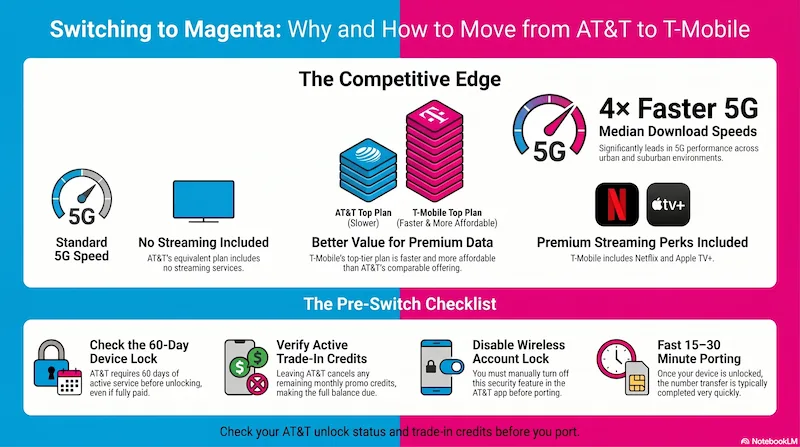
Infographic generated via NotebookLM from official carrier policy sources. Analysis by SwitchNinja Staff.
💵 T-Mobile Switching Offer
T-Mobile Keep and Switch — up to $800 back
T-Mobile's Keep and Switch program may reimburse your remaining AT&T device balance — up to $800 per line via virtual prepaid Mastercard. The flow: pay off and unlock your AT&T device, port your number to T-Mobile, then submit your AT&T final bill or device payoff proof at T-Mobile's redemption portal within 30 days. Terms and eligibility vary — verify current offer at t-mobile.com before switching.
AT&T vs T-Mobile: plan-by-plan comparison
Both carriers price similarly at the top end — but the features tell a different story. Prices shown for 1 line with AutoPay. Taxes and fees are extra on all plans below.
| Plan | Price/mo | Hotspot | Streaming perks |
|---|---|---|---|
| AT&TValue 2.0 5GB high-speed |
$50 | 3GB | None |
| AT&TExtra 2.0 Unlimited (100GB priority) |
$70 | 50GB | None |
| AT&TPremium 2.0 Unlimited premium, LatAm roaming |
$90 | 100GB | None |
| AT&TElite 2.0 Unlimited premium, global roaming |
$110 | 250GB | None |
| T-MobileEssentials Unlimited (50GB priority) |
$60 | 3GB | None |
| T-MobileExperience More Unlimited Premium (no deprioritization) |
$85 | 60GB | Netflix (Standard with Ads) + Apple TV+ ($3/mo) |
| T-MobileExperience Beyond Unlimited premium, international |
$100 | 250GB | Netflix (Standard with Ads) + Hulu + Apple TV+ ($3/mo) |
AT&T prices with bank account or AT&T Citi card AutoPay (-$10/line); debit AutoPay saves only $5/line. T-Mobile prices with any AutoPay (-$5/line). Taxes and fees extra on all plans. Prices verified May 2026.
Where T-Mobile wins on value
AT&T Premium 2.0 ($90) → T-Mobile Experience More ($85): Save $5/mo and gain Netflix (Standard with Ads) and Apple TV+ at just $3/mo — combined retail value of ~$15–19/mo. You pay less and get more streaming included.
Note at the mid-tier: AT&T Extra 2.0 ($70) is $15/mo cheaper than T-Mobile Experience More ($85). If you don't need Netflix or the international perks, AT&T Extra 2.0 remains strong value for unlimited service. The switch makes the most sense moving from Premium 2.0, where T-Mobile is cheaper and more feature-rich.
Is switching to T-Mobile right for you?
Switch if you…
- Live in a city or suburb with strong T-Mobile 5G
- Are on AT&T Premium 2.0 ($90) — T-Mobile Experience More is $5/mo cheaper and includes Netflix + Apple TV+
- Use Netflix or Apple TV+ and want them bundled
- Travel internationally and want better roaming perks
- Have no active AT&T trade-in credits remaining
Wait (or skip) if you…
- Are on AT&T Extra 2.0 ($70) — T-Mobile Experience More would cost $15 more per month
- Have active monthly AT&T trade-in promo credits
- Are in a rural area where AT&T outperforms T-Mobile
- Own an AT&T device that hasn't hit 60 days yet
- Still owe a balance on an AT&T device payment plan
📍 Coverage tip
T-Mobile leads on 5G speed in dense cities. AT&T tends to perform well in rural and suburban markets, particularly in the South and Southeast. Check both carriers' coverage maps at your home, work, and regular travel routes before switching. If AT&T coverage is consistently stronger at the addresses that matter to you, the feature upgrade may not be worth the network trade-off.
Before you switch: 4 things to check
Check 1
Is your AT&T device unlocked?
AT&T's unlock requirements for postpaid devices:
- Paid in full + 60 days active: Both conditions must be met. Paying off the balance doesn't bypass the 60-day waiting period.
- After payoff, wait 48 hours before submitting an unlock request at the AT&T Device Unlock Portal. Approval takes an additional 24–48 hours.
- Account in good standing: No past-due balance, no active fraud or lost/stolen flag on the device.
- AT&T Prepaid device: Requires 6 months of paid, active service before unlock eligibility.
To confirm unlock status on iPhone: Settings → General → About → look for "No SIM Restrictions." If it says "SIM locked," your unlock request hasn't processed yet.
Check 2 — Most important for AT&T customers
Do you have active AT&T trade-in promotional credits?
This is the most expensive mistake AT&T customers make when switching. If AT&T gave you a promotional credit — like "$800 off when you trade in your phone" — that credit is paid out in monthly installments over 30–36 months.
The clawback: When you port out, AT&T stops all remaining credits immediately and accelerates the outstanding device balance to your final bill. You don't repay credits already received — but you lose all future credits, and the remaining installment balance becomes due at once.
How to check: Log into the myAT&T app → Installment Plan or Device Overview → look for any monthly bill credit tied to a promotion. If you see one, check the remaining term and calculate the total credit value before deciding whether to switch now or wait.
Check 3
Disable AT&T Wireless Account Lock
AT&T has a security feature called Wireless Account Lock that blocks port-out requests. If it's active when T-Mobile tries to pull your number, the transfer will be automatically rejected. Disable it in the AT&T app or att.com under your account security settings before initiating the port. (The exact navigation varies by app version — look for "Wireless Account Lock" in your profile or security settings.) You can re-enable it after the transfer is complete.
Check 4
Time your switch — AT&T does not prorate your final bill
If you port out one day into a new billing cycle, you'll be charged for the entire month. Plan your switch for 3–5 days before your AT&T cycle ends to ensure the port completes without triggering a new full month's charge.
Tip: Download your last 3–6 months of AT&T PDF bills from the myAT&T app before you start the port. Once you port out, you may lose access to the app — and you'll need those bills if you're filing for T-Mobile's Keep and Switch reimbursement.
How to switch: step-by-step
Step 1
Pay off your AT&T device (if financed)
In the myAT&T app, go to Installment Plan and pay the remaining balance in full. Confirm the balance shows $0. Then wait 48 hours before submitting the unlock request — this processing delay is an AT&T requirement. After submitting, approval typically takes an additional 24–48 hours.
Step 2
Confirm the device is unlocked
On iPhone: Settings → General → About → Carrier Lock → should say "No SIM Restrictions." If it says "SIM locked," wait for the unlock approval to process before continuing.
Step 3
Disable Wireless Account Lock
Log into the AT&T app or att.com and find Wireless Account Lock in your account security settings. Toggle it off for the line you're moving. Takes effect immediately. (The exact menu path varies by app version — search "Wireless Account Lock" in the app if needed.)
Step 4
Gather your AT&T account details
You'll need three things from AT&T:
- Account number — found on your monthly bill or in the myAT&T app under Account Overview
- Number Transfer PIN — dial *PORT from your AT&T device, or go to myAT&T app → Profile → Settings → Transfer phone number. This is different from your account passcode — use the wrong one and the port will fail. Valid for 4 days only — generate it when you're ready to complete the switch.
- Billing ZIP code — the ZIP on file with AT&T, which may differ from your current address
Step 5
Sign up with T-Mobile and submit the port
Go to t-mobile.com, choose your plan, and during activation select "Bring my number." Enter your AT&T phone number, account number, Number Transfer PIN, and billing ZIP code. Enter everything exactly as it appears on your AT&T account — mismatched details are the most common reason ports fail. Do not cancel AT&T at this step.
Step 6
Wait for completion — keep AT&T active
Most ports complete in 15–30 minutes, though some take up to 24 hours. Your AT&T line stays active throughout. Once T-Mobile confirms the port is complete, your AT&T account closes automatically. Verify your AT&T account shows as closed within a day or two.
Common gotchas (and how to avoid them)
| Gotcha | How to avoid it |
|---|---|
| Canceling AT&T before port completes | Never cancel first — the port closes AT&T automatically. Canceling early can kill your number. |
| 60-day lock after purchase | Even if fully paid off, AT&T won't unlock until 60 days of active service. Plan around this timeline. |
| Using account passcode instead of Number Transfer PIN | These are different. Generate the Number Transfer PIN via *PORT or myAT&T app. Valid only 4 days. |
| Wireless Account Lock still enabled | Disable it in AT&T app security settings before starting the port request. |
| Trade-in credit clawback surprise | Check remaining promo credits in myAT&T before switching — remaining balance accelerates to your final bill. |
| Losing myAT&T app access after port | Download your last 3–6 months of PDF bills before starting — you'll need them for Keep and Switch reimbursement. |
| Switching mid-billing cycle | Port 3–5 days before your AT&T bill cycle ends. AT&T does not prorate the final month. |
⚡ SwitchNinja take
T-Mobile for 5G speed + streaming bundles — and at the top tier, it's also cheaper.
The strongest case for switching: AT&T Premium 2.0 at $90/mo → T-Mobile Experience More at $85/mo — you save $5/mo and pick up Netflix (Standard with Ads) and Apple TV+ at $3/mo, which retail for ~$15–19/mo combined. You pay less and get more. If you're on AT&T Extra 2.0 at $70, T-Mobile Experience More would cost you $15 more per month — that switch only makes sense if the streaming bundle covers the difference.
The process itself is straightforward once you handle the 60-day unlock period, disable Wireless Account Lock, and confirm there are no remaining trade-in credits. T-Mobile's Keep and Switch program can offset any remaining AT&T balance — download your bills before porting so you're ready to file.
Want the full side-by-side? See our AT&T vs T-Mobile comparison or read the AT&T review.