Quick answer
You used up your plan's high-speed data allowance. Your connection is still working — your carrier throttles your speed to a much slower rate (often around 128 Kbps) for the rest of the billing cycle. At that speed: texts and calls are fine, basic navigation works, but video streaming and video calls are very poor quality.
To fix it now: connect to Wi-Fi, buy a data add-on (if your carrier offers one), or wait for your billing cycle to reset. Full speed returns automatically on your reset date.
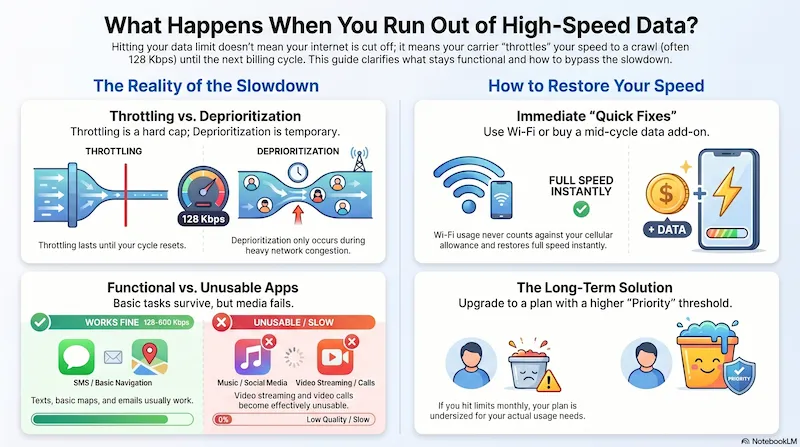
Infographic generated via NotebookLM from official carrier policy sources. Analysis by SwitchNinja Staff.
What "running out" actually means
Every plan has a high-speed data limit — even most "unlimited" plans. The limit isn't how much data you can use; it's how much data you can use at full speed. After you hit it, the carrier throttles your connection down to a much slower speed for the rest of the month.
On capped plans (e.g., 10GB, 15GB, 25GB): once you use your GB allowance, speeds drop hard — typically to 128 Kbps — until your next billing cycle. Your data isn't gone; it's slowed.
On unlimited plans: most have a "priority data" threshold (e.g., 35GB, 50GB, 70GB). After that threshold, you move to lower priority during congestion — but this is deprioritization, which is different from a hard throttle. See the box below.
Throttling vs. deprioritization — important distinction
Throttling = a hard speed cap that kicks in after you hit your data limit. You're stuck at the slower speed until your billing cycle resets — no matter what tower you're on or how light traffic is.
Deprioritization = you move to the back of the line during congestion only. On an uncrowded tower, you'll still get full speed. On a busy tower, you'll slow down temporarily. Full speed returns automatically when traffic clears — no billing cycle reset required. See our priority data guide for the full breakdown.
What still works — and what doesn't
At throttled speeds (128–600 Kbps), some things still work fine. Others are essentially unusable.
| Activity | Data requirement | Works when throttled? |
|---|---|---|
| SMS / phone calls | None — not data-dependent | ✓ Yes, always |
| iMessage / text-only chats | Very low | ✓ Yes |
| Basic maps / navigation | Low | ✓ Usually yes |
| Email (text only) | Low | ✓ Yes |
| Basic web browsing | Low–Medium | ⚠ Slow but functional |
| Music streaming (Spotify, Apple Music) | Low–Medium | ⚠ Low quality only |
| Social media (text + photos) | Medium | ⚠ Images load slowly |
| Video streaming (YouTube, Netflix) | High | ✗ Effectively unusable |
| Video calls (Zoom, FaceTime, WhatsApp) | High | ✗ Very poor quality |
| File downloads / app updates | High | ✗ Extremely slow |
Your options right now
1. Connect to Wi-Fi (free, instant)
Wi-Fi bypasses your cellular data entirely. If you're at home, work, or anywhere with a trusted network — connect and you'll have full-speed internet immediately. Wi-Fi usage never counts against your cellular data allowance.
2. Buy a data add-on (if your carrier offers it)
Some carriers let you purchase additional high-speed data mid-cycle. Open your carrier's app and look for "Buy more data," "Add-on," or "Data boost." Typical cost: $5–$15 for 1–5GB. US Mobile, Mint Mobile, and Tello offer this. Visible does not — their speed model works differently.
3. Wait for your billing cycle to reset (free)
Your full data speed returns automatically on your billing cycle date. Check your carrier's app to see when your cycle resets. If you're within a few days of your reset date, this is usually the easiest option.
4. Switch to a plan with a higher threshold (long-term fix)
If you're hitting your limit every month, your plan is undersized for your usage. US Mobile Unlimited Starter at $25/mo includes 70GB priority data — more than most people use. Upgrading to a plan with a higher threshold is often the same price or cheaper than what you're paying now.
How to check how much data you've used
iPhone: Settings → Cellular → scroll down to see per-app data usage. Tap "Reset Statistics" at the start of each billing cycle to track monthly usage accurately.
Android: Settings → Network & internet → Data usage. Most Android phones let you set a billing cycle start date to track accurately month-to-month.
Carrier app: The most accurate source. Your carrier's app shows remaining high-speed data and the exact reset date — use this rather than your phone's built-in tracker since carrier accounting can vary slightly.
If this keeps happening: plans with more priority data
Hitting your limit once is a usage spike. Hitting it every month means your plan is undersized. Here's how the top options compare on priority data threshold — the number that determines when slowdowns kick in.
| Plan | Price | High-Speed Threshold |
|---|---|---|
| US Mobile Unlimited Starter | $25/mo | 70GB priority data (unlimited on AT&T network) |
| Visible+ | $35/mo | Unlimited premium data — no deprioritization (new accounts) |
| US Mobile Unlimited Premium | $44/mo | No hard priority cap — no throttling trigger |
| Metro by T-Mobile Unlimited | $25/mo | Deprioritized during congestion — no hard monthly threshold |
| Mint Mobile Unlimited | $30/mo (annual) | Verify current threshold directly with Mint before purchasing |
Prices and thresholds as of May 2026. Verify current plan terms with carrier before switching. US Mobile AT&T network has no hard priority cap on Unlimited Starter.
Frequently asked questions
Why is my unlimited data suddenly so slow?▼
You likely hit your plan's priority data threshold. "Unlimited" means you won't be cut off — not that you'll have full speed all month. After you exceed the priority threshold (e.g., 35GB, 50GB, 70GB), your carrier slows your connection or moves you to lower priority during congestion. The telltale sign: if calls and texts still work normally, it's throttling or deprioritization — not a signal problem.
Does the carrier notify you before throttling starts?▼
Some do, some don't. Major carriers and many MVNOs send a text or push notification when you've used 75–90% of your high-speed data. Not all carriers do this. The most reliable way to track your remaining high-speed data is to check your carrier's app regularly — especially in the second half of your billing cycle.
Does hotspot data have its own separate throttle?▼
Yes. Hotspot data and your phone's regular data are tracked in separate buckets on most plans. You can hit your hotspot limit while still having high-speed data left on your device — and vice versa. Check your plan's specs for both the device data threshold and the hotspot data threshold separately.
How much data does the average person use per month?▼
The US average is around 15–20GB per month. If you're regularly hitting a 15GB plan limit, you likely need a 30–50GB plan or an unlimited plan with a 70GB+ priority threshold. See our data usage guide to size your plan correctly.
⚡ The Bottom Line
Your data didn't disappear — it got slowed. Full speed is coming back on your reset date.
Right now: connect to Wi-Fi. If it keeps happening: check if your plan's threshold matches your actual usage. US Mobile Unlimited Starter at $25/mo gives 70GB of priority data — more than most people ever hit — and costs the same or less than what most people are currently paying.
Want a plan with more priority data? Read the US Mobile review or the Visible review.