Quick answer
Slow cell data is usually caused by one of seven things: weak or blocked signal, network deprioritization, background apps, hitting your plan's soft cap, an outdated SIM or network settings, old software, or cache and VPN issues.
Start with a restart and a speed test. If speeds are low everywhere regardless of location, you've likely hit your data cap or you're being deprioritized. If speeds are fine on a speed test but a specific app feels slow, the problem is the app — not your data.
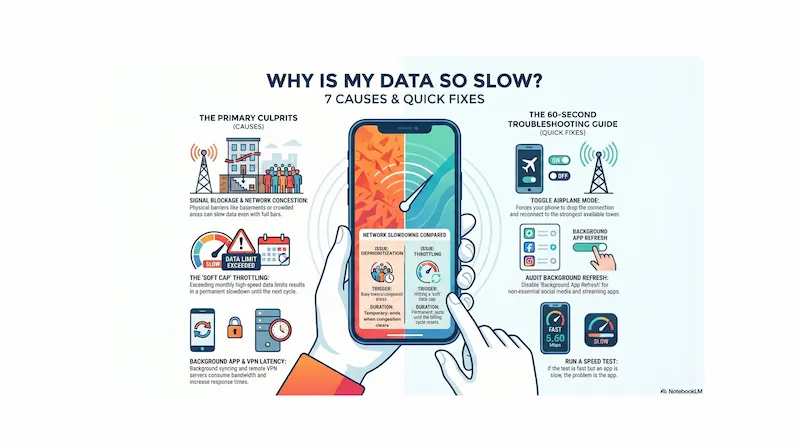
Infographic generated via NotebookLM from official carrier policy sources. Analysis by SwitchNinja Staff.
The 7 most common reasons your data is slow
Cause 1
Weak or blocked signal
If you're indoors, in a basement, or in a building with thick concrete or metal construction, your phone may connect to a distant tower at low signal strength — which means slow speeds even if it shows bars. High-frequency 5G (labeled 5G+, 5G UW, or 5G UC on some phones) tends to have shorter range and weaker wall penetration than lower-band signals, though performance varies by carrier, band, and local deployment.
The fix
Move closer to a window or step outside — this can noticeably improve speeds. If you see a 5G+ or 5G UW icon, try manually switching to LTE in your phone's cellular settings. LTE generally travels through walls more effectively and often delivers a more consistent indoor connection than high-band 5G.
Cause 2
Network deprioritization or congestion
A common cause of "full bars but slow data" — especially on lower-tier plans. When a tower is busy (during rush hour, at a stadium, in a crowded neighborhood), carriers push lower-priority users to the back of the line. This is called deprioritization and it's different from throttling: deprioritization only kicks in when the tower is congested, while throttling is a permanent speed cap after you hit your data threshold. If you're on a basic or prepaid plan, or a budget unlimited tier, you may be deprioritized during busy periods. You'll have full signal but speeds that are significantly slower.
The sign: Your data is fast in quiet areas but slow in busy places — stadiums, malls, downtown during rush hour.
The fix
Check your carrier app to see if your plan includes "Priority" or "Premium" data and how much you have left. If congestion is consistently affecting you, upgrading to a higher plan tier — or switching to a carrier with better coverage in your area — is often the most effective long-term fix. How deprioritization works →
Cause 3
Background apps consuming your data
Apps continue refreshing, syncing, and downloading updates in the background even when you're not using them — social media, cloud backup, photo libraries, and streaming apps are common culprits. If your phone feels warm and your data usage is higher than you'd expect, background activity is likely eating into your bandwidth and slowing everything else down.
The fix
On iPhone: Settings → General → Background App Refresh → turn off non-essential apps. On Android: Settings → Network & Internet → Data Usage → Background Data, and toggle off apps you don't need refreshing constantly. Restarting also clears any stuck background processes immediately.
Cause 4
You've hit your plan's soft data cap
Most "unlimited" plans aren't truly unlimited at full speed. After you use a certain amount of high-speed data in a billing cycle — often somewhere between 35GB and 100GB depending on your plan — your carrier may throttle your speeds for the rest of the month. Unlike deprioritization, this slowdown applies everywhere, not just on busy towers. You'll be slow in a rural field with no one else around.
The sign: Slow speeds everywhere, all the time, regardless of location or time of day — and you're late in your billing cycle.
The fix
Open your carrier's app and check your data usage. If you've hit your plan's threshold, speeds may stay reduced until your billing cycle resets. Short-term: use Wi-Fi more. Long-term: consider a plan with a higher soft cap or more high-speed data. Throttling vs. deprioritization explained →
Cause 5
Outdated SIM card or stale network settings
An old, damaged, or improperly provisioned SIM card can sometimes cause connectivity and speed issues, as can corrupted network settings on the phone itself. If you've had your current SIM for several years and consistently see slower speeds than others on the same carrier in the same area, this may be worth checking.
The sign: Persistently slow speeds in areas where others on the same carrier report good service.
The fix
First, try resetting network settings on your phone (Settings → General → Transfer or Reset → Reset → Reset Network Settings on iPhone; Settings → General Management → Reset → Reset Network Settings on Android). If that doesn't help, ask your carrier for a new SIM or eSIM — most carriers will replace an older SIM for free, and a newer one may unlock faster bands.
Cause 6
Outdated phone software or carrier settings
Old operating system versions can have bugs that affect cellular performance, battery management, and radio behavior. Carrier settings updates — separate from iOS/Android updates — also push network optimizations to your phone. If you've been skipping updates, your phone may be missing improvements that affect data performance.
The fix
Check for OS updates (Settings → General → Software Update on iPhone; Settings → System → System Update on Android). On iPhone, also check for carrier settings updates: Settings → General → About — if an update is available, a prompt will appear. Install both and restart.
Cause 7
Cache clutter, VPN latency, or a misbehaving app
Sometimes the network is fine but a specific app or setting makes things feel slow. These issues affect how fast a particular app or browser responds — not your raw mobile data connection. A VPN routes your traffic through a remote server and adds latency; if that server is distant or overloaded, perceived speeds drop noticeably. A bloated browser cache affects how quickly websites appear to load. A misbehaving app may be the only thing that's slow while everything else works fine.
The sign: A speed test shows normal numbers, but your browser or a specific app feels sluggish — the network is fine, the app isn't.
The fix
Turn off your VPN and test again. Clear your browser cache (in Chrome: three dots → History → Clear Browsing Data → Cached images and files). If only one app is slow, delete and reinstall it. If your VPN is necessary, try switching to a server closer to your physical location or a faster protocol (WireGuard tends to add less latency than older protocols).
Quick troubleshooting checklist — try in this order
If you're not sure which cause applies, start here and work through in order — most problems get resolved in the first three steps:
Toggle Airplane Mode off and on
Forces your phone to drop its current tower connection and reconnect to the strongest available signal. Fixes more problems than people expect and takes about 15 seconds.
Count your signal bars
1–2 bars = physical signal issue. Move toward a window or outside. 3–5 bars = signal isn't the problem.
Run a speed test
Use an app like Ookla Speedtest or Fast.com. If speeds are high but a specific app is slow, the problem is the app, not your data. If speeds are low everywhere, continue through this list.
Check your data usage in your carrier app
If you've hit your plan's high-speed threshold, speeds will stay reduced until your billing cycle resets. This is the most common cause of persistent slow data late in the month.
Turn off background app refresh
Restrict background data for social media, streaming, and cloud backup apps. Then restart your phone to clear any stuck processes.
Check for OS and carrier settings updates
Install any pending updates. On iPhone, also check for carrier updates under Settings → General → About.
Reset network settings
Last resort before calling your carrier. This clears saved Wi-Fi passwords, VPN settings, and cellular configurations and forces a fresh start. It fixes persistent issues that rebooting doesn't resolve.
When the problem is your plan, not your phone
If you've run through the checklist and data is still slow, the issue may be structural — your plan's priority tier, your carrier's coverage in your area, or both. A few things to consider:
You're on a basic or deprioritized plan tier
Many budget unlimited plans — including some MVNOs — are deprioritized at all times on congested towers. If you're in a dense urban area and consistently slow, a plan with higher-priority data may be the fix, not a troubleshooting step. What is priority data? →
Your carrier has weak coverage in your area
No plan upgrade will fix a coverage gap. If people on other carriers get fast data in places where yours is consistently slow, the problem may be carrier-specific. Check coverage maps and consider whether switching makes sense.
Your soft cap is too low for your usage
If you're consistently hitting your plan's high-speed threshold before the month ends, you need a higher tier — or to shift more usage to Wi-Fi. What unlimited plans actually include →
⚡ The Bottom Line
Most slow data problems are fixable. A few aren't — and those point to your plan.
Start with a restart and a speed test. If it's consistent and location-independent, check your data usage — you may have hit your soft cap. If it's location-specific and tied to busy times, you're being deprioritized. If neither of those is the cause, work through the checklist above in order.
If everything checks out and data is still consistently slow, the problem may be your plan tier or your carrier's local coverage — and the fix is switching, not troubleshooting.
Frequently asked questions
Why is my phone data so slow even though I have full bars?▼
Full bars mean you have a signal, but not necessarily a fast one. The most common causes of slow data with full bars are network deprioritization (your plan tier gets pushed back during busy periods), hitting your plan's soft data cap, background apps consuming bandwidth, or a VPN adding latency. Running a speed test app can help confirm whether the issue is your connection or a specific app.
How do I know if my carrier is throttling my data?▼
The clearest sign is that your data is slow regardless of location and time of day. If you check your carrier's app and you've used more data than your plan's high-speed threshold, throttling is likely the cause. You can confirm by running a speed test — if speeds are consistently very low everywhere, you've probably hit your soft cap for the month.
Does restarting my phone actually fix slow data?▼
Yes, often. Restarting forces your phone to drop its current tower connection and find a fresh one, which can resolve temporary congestion issues, fix stuck network settings, and clear background processes consuming bandwidth. It's the fastest first step and fixes the problem more often than people expect.
Why is my 5G so slow indoors?▼
High-frequency 5G (sometimes shown as 5G+, 5G UW, or 5G UC) is extremely fast outdoors near a tower but has poor penetration through walls, ceilings, and building materials. If your phone shows 5G indoors but speeds are slow, try manually switching to LTE in your cellular settings — LTE travels through walls more effectively and often delivers a faster, more stable indoor connection.
If your carrier is the problem, it may be time to compare. See our T-Mobile vs AT&T comparison or read the T-Mobile review.