Advertiser Disclosure: We may earn a commission when you click carrier links. This never influences our rankings. Read our affiliate disclaimer
Switching Carriers · Updated May 2026
How to cancel T-Mobile — without surprise charges.
Phone call, T-Life app, or in-store — there are four ways out. The trick is checking a few things first so your final bill doesn't end bigger than it should.
The primary method is a phone call — call 1-877-746-0909 (or dial 611 from your T-Mobile phone) and say "Cancel service." T-Mobile does not allow cancellations online. You can also use the T-Life app chat or visit a corporate T-Mobile store — but phone is the fastest path for most people.
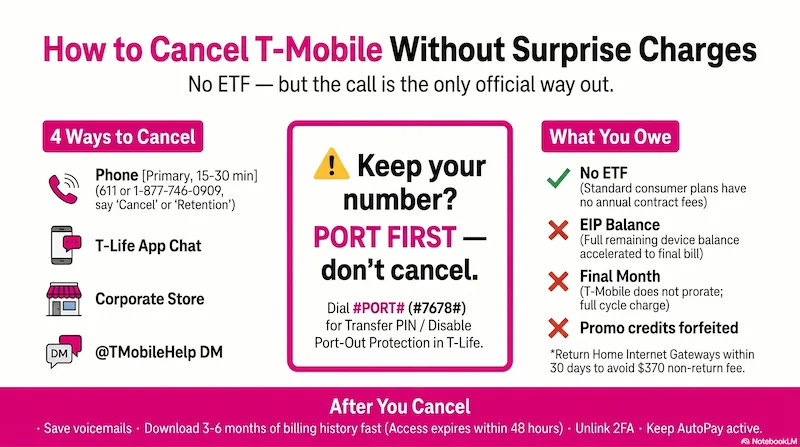
Infographic generated via NotebookLM from official carrier policy sources. Analysis by SwitchNinja Staff.
Before you cancel: 5 things to check
Most T-Mobile bill surprises are avoidable. Five minutes now saves a larger-than-expected final bill.
Do you still owe money on a device?
If you have a T-Mobile Equipment Installment Plan (EIP), the remaining balance is accelerated onto your final bill when you close the entire account. If you cancel only one line while others remain active, EIP payments may continue monthly on the remaining account rather than coming due all at once.
Open T-Life → Manage → tap the gear icon next to the line to see your EIP balance.
Are you receiving promotional bill credits?
T-Mobile frequently offers trade-in promos and new-line credits that pay out monthly over 24 months. Canceling before the promotional period ends forfeits all remaining credits — and if the promo was tied to a device, the remaining installment balance may also become due.
Review your current bill in T-Life for any active credits before canceling.
When is your billing cycle?
T-Mobile does not prorate your final month. Canceling early in your cycle still means you pay through the end. Find your cycle date in T-Life → Account → Billing.
Multi-line note: Removing one line may change the per-line pricing for everyone else on a family plan. Check the updated cost first.
Connected devices: Canceling your phone line does NOT automatically cancel tablet, Apple Watch, or hotspot lines. Those must be canceled separately.
Do you have T-Mobile Home Internet?
The Home Internet Gateway must be returned within 30 days of canceling. If not, you may owe the replacement cost — up to $370 per current T-Mobile guidelines, varying by model. Home Internet is billed independently from wireless lines — cancel it separately. Keep the return tracking number as proof.
Is your phone unlocked?
T-Mobile locks phones purchased on installment plans until they are paid in full. Most devices also need to have been active on the T-Mobile network for at least 40 days before they're eligible. Pay off your EIP balance first, then request an unlock through T-Life or at t-mobile.com/unlock.
It's much easier to complete unlock requests while the account is still open — account verification can become more complicated afterward.
Sign up with your new carrier and give them your T-Mobile account number, a Transfer PIN, and your billing ZIP code. T-Mobile automatically cancels the line once the port is confirmed complete — do not cancel your T-Mobile account until the port is done.
How to get your Transfer PIN: T-Life → Manage → gear icon → Permissions & controls → Transfer PIN. Or: t-mobile.com → Profile → Line Settings → Request transfer PIN. Or dial #PORT# (#7678#). The PIN is typically valid for 7 days — don't generate it until you're ready. Only the Primary Account Holder can generate a Transfer PIN.
Your account number: 9 digits. Find it on your bill or in T-Life → Manage tab.
Port-Out Protection / Number Lock: If enabled, the port will be blocked — your new carrier will receive an "account frozen" error. Disable it in T-Life → Account → Account settings before initiating the transfer. Full porting guide →
How to cancel T-Mobile: 4 methods
Phone is the only officially documented self-serve method. The others are real options — each with trade-offs.
- T-Mobile account number (9 digits — T-Life → Manage, or any bill)
- Phone number(s) you want canceled
- Your 6-digit account PIN (set in T-Life → Account → Profile — not your phone lock code)
- 1Call 1-877-746-0909 from any phone, or dial 611 from your T-Mobile phone.
- 2When prompted, say "Cancel service" or "Retention." This routes you to the team that can close the account.
- 3A retention rep will likely offer discounts or a temporary suspension. If you want to cancel, be direct: "I want to cancel my T-Mobile wireless service. I'm not interested in any retention offers. Please proceed with the cancellation."
- 4Before hanging up: confirm the effective date and ask for a cancellation confirmation number. Cancellations are typically processed at end of billing cycle.
- 1Open the T-Life app and sign in.
- 2Tap the Chat icon (speech bubble in the bottom nav).
- 3Type "Cancel service" to connect with a virtual agent or request a live representative.
- 4Follow the prompts. Ask for a written confirmation via chat or email before you close the session.
- 1Find a corporate T-Mobile store — not an authorized retailer. Corporate locations have full account access.
- 2Bring a government-issued photo ID and your account PIN.
- 3Only the Account Holder can request a cancellation.
After you cancel: full checklist
Nine things to do once the cancellation is confirmed — before your account fully closes.
Save your voicemails
T-Mobile voicemails are deleted when your line closes. Listen to any important ones and save them before service ends. Your Visual Voicemail inbox is not transferred to a new carrier.
Download your billing history
Log in to T-Life or my.t-mobile.com and download your last 3–6 months of PDF bills before you cancel. T-Life access can break within 24–48 hours of account closure, making it difficult to retrieve billing records afterward.
Export your DIGITS contacts
If you use T-Mobile DIGITS, export your contacts and preferences before canceling — DIGITS access is removed when the account closes.
Return Home Internet equipment
If you have a T-Mobile Home Internet Gateway, return it within 30 days. If you don't, you may owe the replacement cost — up to $370 per current T-Mobile guidelines, varying by model. Use T-Mobile's prepaid return label and keep the tracking number as proof.
Unlink your number from 2FA accounts
Once canceled, your number will eventually be reassigned to a new customer. Update any account that sends login codes to your phone — banking, email, social media — and switch to an authenticator app or different contact method.
Don't cancel your payment method yet
If you have AutoPay set up, it stays active until your final balance is fully paid. Remove your payment method too early and you risk missing the final bill, which can trigger late fees or collections.
Check your streaming perks
T-Mobile plan perks like Netflix, Apple TV+, or Hulu are canceled when your service ends. If T-Mobile was covering a subscription you previously had directly, check whether it reactivates as a charge on your credit card after canceling.
Confirm the cancellation is complete
Within a day or two, log into T-Life or call to confirm the line shows as canceled. If you see an active account or receive an unexpected bill, reference your cancellation confirmation number when you call back.
Review your final bill carefully
Your final bill includes service through the end of your billing cycle, any remaining EIP balance, forfeited promo credits, and taxes and fees. If anything looks off, dispute it within 30 days of the bill date.
You don't need to call to cancel. Turn off AutoRefill in your prepaid account settings and stop renewing. Your service ends at the end of your current paid period. If your balance reaches $0 and stays there for 120 days, T-Mobile automatically deactivates the account — no device installment complications, just stop paying.
Only the Account Holder can cancel service, generate a Transfer PIN, or close the entire account. If you're a line user on a family plan and aren't the Account Holder, you may be able to request removal of your own line, but you cannot close the account for others. Call 1-877-746-0909 or dial 611 to confirm your account role if you're unsure.
What you will (and won't) owe
Most current T-Mobile plans are month-to-month with no annual contract, so there's no ETF. The surprises come from device balances and promo clawbacks.
Applies to standard consumer wireless plans as of May 2026. Business plans may have different terms.
Canceling T-Mobile service itself does not affect your credit score. However, unpaid final bills or device balances that go to collections can appear on your credit report. Pay your final bill promptly and dispute any errors within 30 days.
Call 1-877-746-0909 (or dial 611) and say "Cancel service" — that's the fastest path for most T-Mobile customers.
T-Mobile doesn't allow online cancellations, but the phone process is straightforward. The surprises come from device installment balances, promotional credit clawbacks, and Home Internet Gateway return fees — all avoidable with a quick account review before you call.
Leaving T-Mobile? Here's where to go next.
Done reading? Find your plan in 60 seconds.
Answer 8 quick questions and get a personalized top-3 — with reasons, not just rankings.
Find My Perfect PlanCommon questions
Can I cancel T-Mobile online or through the app?
T-Mobile's T-Life app allows you to cancel individual lines but canceling an entire account typically requires calling 1-877-746-0909. You can also cancel in-store or reach T-Mobile support via social media channels.
What happens to my device installment balance when I cancel T-Mobile?
If you cancel an entire account, any remaining device installment balance is accelerated and becomes due on your final bill. Canceling a single line on a multi-line account does not accelerate the device balance for remaining lines.
Does T-Mobile have an early termination fee?
No, for standard postpaid plans. T-Mobile has not charged early termination fees on its main plans for years. Your financial obligation is any unpaid device installment balance — that appears on your final bill but is not an ETF.
Does T-Mobile prorate your bill if you cancel mid-cycle?
Generally no. T-Mobile's billing is not prorated on cancellation for most plans — you are charged through the end of the current billing cycle. Check the billing end date in the T-Life app before choosing when to cancel to avoid paying for more days than needed.
Done reading? Find your plan in 60 seconds.
Answer 8 quick questions and get a personalized top-3 — with reasons, not just rankings.
Find My Perfect Plan →