Advertiser Disclosure: We may earn a commission when you click carrier links. This never influences our rankings. Read our affiliate disclaimer
Switching Carriers
How to Cancel AT&T Wireless Service in 2026
Unlike Verizon, AT&T does not have a straightforward self-serve cancel button for most wireless accounts — the primary method is a phone call. Here's the full process, what to check first, and how to avoid a larger-than-expected final bill.
Quick answer
The short version — read on for the full details.
For most AT&T wireless accounts, the primary cancellation method is a phone call. Call 1-800-331-0500 (or dial 611 from your AT&T phone) and say "Cancel service."
App and website cancellation are limited — they work for tablets and wearables, and for IL/MA/NY customers who ordered online, but most standard wireless accounts must go through phone or chat.
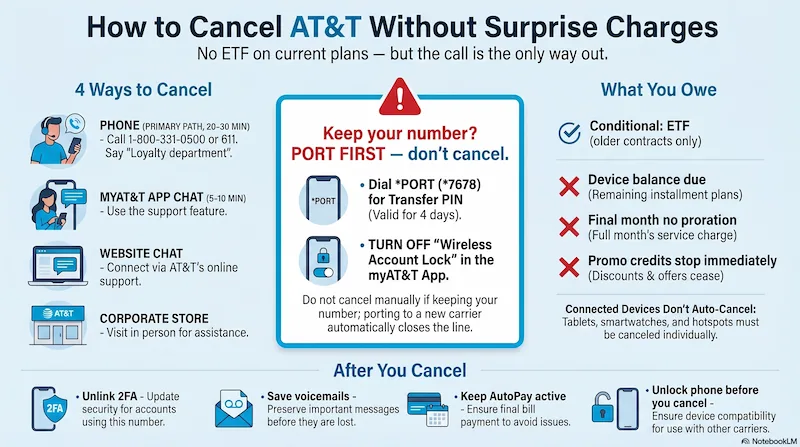
Infographic generated via NotebookLM from official carrier policy sources. Analysis by SwitchNinja Staff.
Before you cancel: 5 things to check
Most surprise charges on a final AT&T bill are avoidable — if you check these first.
Do you still owe money on a device?
If you have an AT&T installment plan, the remaining balance — including accessory installments — becomes due immediately on your final bill when you cancel. Log into myAT&T → Manage wireless → select the device to see your balance.
Are you under a service contract? (ETF)
Most current AT&T plans have no contract, but if you signed an older 1- or 2-year agreement, canceling before it ends triggers an Early Termination Fee. Consumer ETF: $58–$325, reduced for each full month completed. Business ETF: up to $750.
To check: log into myAT&T → select the line → look under Device info. No ETF if you're on an installment plan — you'll owe the device balance instead.
Did you activate within the last 14 days?
If you're within 14 days of activation (30 days for business), you may be able to return your device and cancel with no ETF and no restocking fee for online purchases.
If you picked up an online order in-store, go to an AT&T store to have the restocking fee waived — it can't be waived over the phone.
Are you receiving promotional credits?
If you activated a new line within the last 90 days as part of a promotion, canceling may revoke those credits and you'll owe the remaining device balance. AT&T gives you 30 days to reinstate service before the balance comes due.
Check your current bill for any active promo credits before canceling.
When is your billing cycle?
AT&T does not prorate your final month — you are charged for the full billing cycle regardless of when you cancel. Canceling on day 2 of a 30-day cycle means you pay for all 30 days. Time your cancellation toward the end of your billing period.
Multi-line note: If you're removing one line from a shared plan, check what the remaining lines will cost — multi-line discounts may shift when a line is removed.
Connected devices: Porting your main phone number does not automatically cancel standalone tablet, Apple Watch, hotspot, or connected-device lines. Those lines continue billing and must be canceled separately.
Dial *PORT (*7678) from your AT&T phone — you'll receive a 6-digit PIN via text. Or: myAT&T app → More → Manage Profile → People & Permissions → Transfer phone number → Request a new PIN.
PIN is valid for 4 days — don't generate it until you're ready to complete the switch.
Check Wireless Account Lock first. If AT&T Wireless Account Lock is enabled, the port will be blocked. Turn it off under Mobile Security settings in myAT&T before initiating the transfer. Full porting guide →
Business accounts: *PORT does not work for business lines. Request the Transfer PIN through your online account at att.com or contact AT&T Business Support. Business PINs are valid for 14 days.
How to cancel AT&T wireless: 4 methods
Choose the method that fits your situation — phone is the primary path for most customers.
Have these ready before you call
- Your AT&T account number (top of any bill, or under Account in myAT&T)
- Phone number(s) you want canceled
- Your 4-digit account PIN or passcode — this is set in your account settings, not your SIM PIN
- Government-issued ID in case identity verification is required
- Call 1-800-331-0500 from any phone, or dial 611 from your AT&T phone.
- When the automated system asks why you're calling, say "Cancel service" or "Loyalty department." This routes you past general support to the team that can actually close the account.
- A loyalty representative will likely offer discounts or suggest suspending service instead of canceling. Suspension still charges fees — it's not a cheaper pause. If you want to cancel, be direct: "I want to cancel my AT&T wireless service. I'm not interested in any retention offers. Please proceed with the cancellation." If they persist, repeat calmly or ask for a supervisor.
- Before you hang up: ask for a cancellation confirmation number and the effective date.
- Open the myAT&T app and sign in.
- Tap the Chat icon.
- Type "Cancel service" to connect with a digital agent or request a callback.
- Follow the prompts or ask to speak with a representative to complete the cancellation.
- Go to att.com and sign in to myAT&T (create an account if needed).
- Click the menu → Support.
- Scroll to My account → "Get bill and account help."
- Expand "Move, change, suspend & cancel service" → select "Cancel wireless service or remove a line."
- Follow the prompts to submit your cancellation request.
- Find a Corporate AT&T Store (not an Authorized Retailer) — corporate locations have more direct account access.
- Bring a government-issued photo ID and your account PIN.
- Only the Account Owner or an authorized user can request a cancellation.
After you cancel: full checklist
Eight things to do in the days after your line closes.
Unlink your number from 2FA accounts
Once your AT&T line is canceled, your number will eventually be reassigned to someone else. Before that happens, update any account that sends login verification codes to your phone — banking, email, social media — and switch to an authenticator app or a different contact method.
Save your voicemails
Voicemails do not transfer to a new carrier and are lost when your AT&T line closes. Listen to any important ones and save them before canceling.
Don't cancel your payment method yet
If you have AutoPay set up, it stays active until your final balance is fully paid. Remove your payment method too early and you could miss the final bill, triggering late fees.
Check your streaming perks
AT&T bundled perks like HBO Max or other add-ons cancel when your service ends. If you previously had a direct subscription with that provider that was paused while AT&T was covering it, check whether it reactivates as a direct charge on your credit card after canceling.
Unlock your phone before leaving
If you plan to use your device on another carrier, pay it off and request an unlock before you cancel. Unlocking after cancellation is significantly harder. Use AT&T's device unlock portal at att.com/deviceunlock.
Confirm the cancellation is complete
Within a day or two, log back in or call to confirm the line shows as disconnected. If you still see an active account or receive an unexpected bill, contact AT&T and reference your cancellation confirmation number.
Review your final bill carefully
Your final bill includes all service charges through the end of your billing cycle, any remaining device installment balance, ETF if applicable, and taxes and fees. If anything looks off, call within 30 days.
Monitor your statements for 60–90 days
Some unexpected charges — such as reactivation fees or misclassified billing items — can appear weeks after cancellation. Check your bank or credit card statements for anything tied to your old AT&T account and dispute promptly if something looks wrong.
You don't need to call. Turn off AutoPay in your AT&T Prepaid account settings and stop renewing. Your service ends at the close of your current paid period and the account expires on its own. No device installment complications — just stop paying.
Only the Account Owner (or an authorized user with verified ID) can cancel service or generate a Transfer PIN. If you're on a family plan and aren't the Account Owner, you may be able to remove your own line but cannot close the entire account. Call 1-800-331-0500 to confirm your account role if you're unsure.
What you will (and won't) owe
Most current AT&T plans are month-to-month with no annual contract, so there's no ETF for most customers. The main charges are the remaining device balance and your final month's bill.
Early termination fee (ETF)
No for current month-to-month plans. Yes if on an older 1- or 2-year contract: consumer $58–$325, business up to $750. Check myAT&T before canceling.
Remaining device installment balance
Due immediately on your final bill if you're on an installment plan. Pay it off early in myAT&T to avoid the lump sum.
Final month of service
Charged through the end of your billing cycle — AT&T does not prorate. Cancel late in your cycle to minimize unused days you're paying for.
Promotional credits
Stop immediately when you cancel. If you were receiving device credits tied to an active line, the remaining device balance comes due.
Taxes and regulatory fees
Applied through the end of your billing cycle on your final bill — same as any regular month.
Restocking fee (14-day return)
Waived automatically for online orders returned by mail. For in-store pickup, you must go to an AT&T store in person to have it waived — can't be done over the phone.
Applies to standard consumer wireless plans as of May 2026. Business and older contract plans may have different terms.
Call 1-800-331-0500 and say "Cancel service" — that's the fastest path for most AT&T customers.
AT&T makes the process more phone-dependent than Verizon, but the call itself is straightforward. The surprises come from device installment balances, promotional clawbacks, and ETFs on older plans — all avoidable with a 2-minute check of your account before you call.
Leaving AT&T? Here's where to go next.
Not sure where to land after AT&T? Compare your options: T-Mobile review, Verizon review, and Mint Mobile review.
Common questions
Can I cancel AT&T service online?
AT&T's website does not currently offer self-service cancellation for wireless accounts. The fastest option is calling 1-800-331-0500 and saying "Cancel service." Chat cancellation is available through the myAT&T app but may take longer than a phone call.
What happens to my device installment balance when I cancel AT&T?
The remaining balance on any financed device becomes due on your final bill. If you had an active promotional trade-in credit, those credits stop as of the cancellation date. Check your account balance before canceling to understand the full payoff amount.
Does AT&T charge an early termination fee?
No, for standard wireless plans on current pricing. AT&T eliminated early termination fees on postpaid plans years ago. However, device installment balances and forfeited promotional bill credits can still create a significant final bill even without a traditional ETF.
Will I keep my phone number when I cancel AT&T?
Yes, if you port your number to a new carrier before canceling. Start the switch by signing up with your new carrier and requesting a port — do not cancel AT&T first. Canceling before porting releases your number permanently.
Done reading? Find your plan in 60 seconds.
Answer 8 quick questions and get a personalized top-3 — with reasons, not just rankings.
Find My Perfect Plan →