Advertiser Disclosure: We may earn a commission when you click carrier links. This never influences our rankings. Read our affiliate disclaimer
Switching Carriers · Updated May 2026
How to cancel Verizon — without surprise charges.
App, website, phone, or in-store — there are four ways out. The trick is checking a few things first so your final bill doesn't end bigger than it should.
SN
By SwitchNinja Staff
6 min read✓ Verified May 2026
This guide covers the general Verizon cancellation process as of May 2026. Steps may vary by account type, device, or promotion. Check your account in My Verizon for your specific situation. SwitchNinja is not responsible for any charges or service interruptions that result. Terms of Use.
Quick answer
The fastest path is the My Verizon app or website chat — open Chat, type "Cancel," and follow the prompts. By phone, call 1-800-922-0204 (or dial 611 from your Verizon phone) and say "Cancel service." Verizon doesn't require a reason or a waiting period — cancellations take effect at the end of your current billing cycle.
Keeping your number? Don't cancel first.
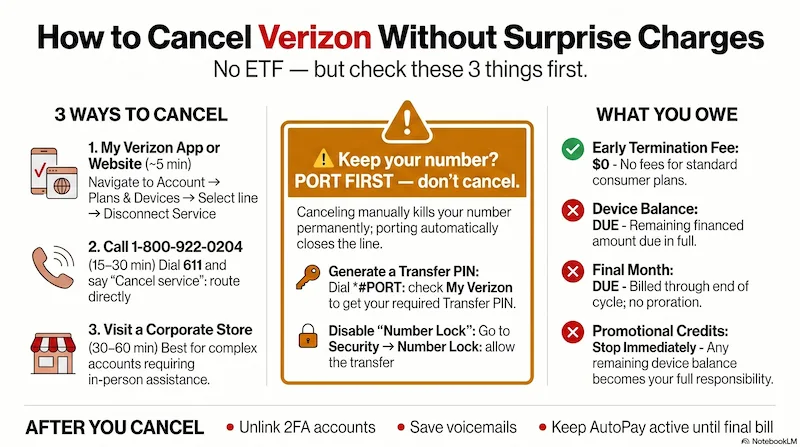
Port your number to your new carrier instead — Verizon automatically closes the line once the transfer completes. Cancel manually and the number is gone.
Infographic generated via NotebookLM from official carrier policy sources. Analysis by SwitchNinja Staff.
Before you cancel: 4 quick checks.
Two minutes here saves you from a final bill that's bigger than expected. Run these in order.
01
Do you still owe money on a device?
If you financed a phone through Verizon's device payment plan, the remaining balance becomes due in full on your final bill when you cancel. Log into My Verizon → Account → Devices to see any outstanding balance.
Pro tipYou can pay off the device balance early through My Verizon before canceling — that way your final bill is just the service charge, with no large device lump sum at the end.
02
Are you receiving promotional monthly credits?
If you got a "free phone" deal or trade-in promotion, those credits stop immediately when you cancel. Any remaining device balance you were paying off through those credits becomes your responsibility. Check My Verizon → Bills → Current charges to see if credits are active.
03
When is your billing cycle?
Verizon does not prorate your final month — you're charged through the end of your current cycle regardless of when you cancel. If possible, time your cancellation near the end of your billing period to avoid paying for unused days.
Pro tipIn My Verizon, go to Billing Overview → Bill History and select any past bill. Your cycle dates are shown at the top.
04
Are you on a multi-line plan?
Removing one line from a shared plan may push the remaining lines to a higher per-line price. Multi-line discounts on Verizon myPlan are based on how many lines are active. Sometimes it makes more sense to cancel all at once.
Watch outSmartwatch, tablet, and hotspot lines do not cancel automatically when you cancel your main phone line. Cancel each connected device line separately or charges will continue.
Keeping your number? Port first — don't cancel.
Do NOT cancel Verizon manually if you want to keep your number. Once a line is canceled, the number is gone.
Sign up with your new carrier, give them your Verizon account number and a Transfer PIN (My Verizon → Account → Transfer PIN, or dial *#PORT). They'll port the number and Verizon closes the line automatically once the transfer completes.
Check Number Lock first. If it's on, the port will be blocked. Turn it off in My Verizon → Security → Number Lock, or dial *611. Full porting guide →
How to cancel: four ways out.
Tap a method to see the steps. The app and website are fastest. Phone handles the most complex cases.
1Open the My Verizon app and sign in as the Account Owner or Account Manager.
2Tap Account at the bottom of the screen.
3Tap Plans & Devices and select the specific line you want to cancel.
4Look for Disconnect Service or Manage Line → Remove Line.
5Follow the prompts to confirm.
Don't see the Disconnect option?
Tap the Chat icon in the app and type "Cancel" — this connects you to a loyalty agent or guided prompts to complete the request.
1Go to verizon.com and sign in to My Verizon.
2Navigate to Account → Account Overview → My Plan.
3Select the device or line you want to remove.
4Choose Disconnect Service.
5If Verizon redirects you to a support page, click Chat with us, type "Cancel," and follow the guided steps.
2026 note
Verizon has reduced some self-service cancellation flows. If you can't find the Disconnect button, the Chat path works for most accounts.
1Call 1-800-922-0204 — or dial 611 from your Verizon phone (free, no minutes used).
2When the automated system asks why you're calling, say "Cancel service" or "Disconnect." This routes you past technical support to the loyalty team who can actually close the account.
3Verify your identity: have your account PIN or the last 4 digits of the account owner's SSN ready.
4Tell the rep you want to disconnect a line or close the account. They may offer a retention deal — you're free to decline.
5Ask for a cancellation confirmation number and the effective date before you hang up.
Be ready for a retention offer
You'll typically be transferred to a loyalty specialist who may offer credits or a lower plan. It's fine to listen — there's no penalty for declining. Hours: Mon–Sat 8 AM–7 PM, Sun 8 AM–5 PM (your local time).
1Find a Verizon Corporate Store at verizon.com/stores — filter for "Verizon Company Store." Authorized Retailers (Victra, Cellular Sales) often cannot process full account cancellations.
2Bring a government-issued photo ID and your account PIN.
3A rep can close the account, help verify your identity if phone verification is failing, or assist with equipment returns.
Fios equipment
If you're returning a Fios router or other leased device, go in-store and get a physical return receipt. Equipment "no-show" fees are a common complaint — keep that receipt.
After you cancel: the full checklist.
Seven things worth doing in the day or two after you disconnect — most protect you from a surprise on the final bill.
01
Unlink your number from 2FA accounts
Federal rules require Verizon to wait 45 days before reassigning your old number. After that, whoever gets your number could receive login codes. Switch any account that texts codes to your phone to an authenticator app or different contact method before you cancel.
02
Save your voicemails
Voicemails don't transfer to a new carrier — they're stored on Verizon's network and lost when your account closes. Listen to any important ones and save them to your phone before canceling.
03
Don't cancel your payment method yet
If you have AutoPay, your final bill will still be charged automatically. Canceling your debit card or bank link before the final bill posts could cost you your AutoPay discount and trigger a returned-payment fee. Wait until the final bill is paid.
04
Check your streaming perks
Verizon perks like Disney+ or Apple Music that were bundled cancel automatically. But if you previously had a direct subscription that Verizon was covering, it may reactivate as a direct charge. Check your Apple ID, Google Play, or credit card statements after canceling.
05
Download your billing history
You can access bills for up to 180 days after cancellation through the Disconnected Accounts page at verizon.com — sign in with your User ID (your mobile number no longer works for login after disconnect).
06
Confirm the line is disconnected
Within a day or two, log back in or call to confirm the line shows as canceled. If you still see an active account or receive an unexpected bill, contact Verizon and reference your cancellation confirmation number.
07
Review your final bill carefully
Your final bill includes all service charges through your cycle end date, any remaining device payment balance, taxes, and fees. Refunds and security deposits are typically processed after the final bill settles.
Account Owner vs. Account Manager
Only the Account Owner can authorize a full account disconnect or generate a Transfer PIN. If you're listed as an Account Manager on a family plan, you may be able to disconnect your own line but cannot close the entire account. Unsure? Check My Verizon → Account → Manage roles, or call 1-800-922-0204.
Changed your mind? You can reverse it.
You can cancel a pending disconnect up until the day before the effective date. Sign into My Verizon → Chat with us → type "Cancel" → follow the prompts to cancel the disconnection request. Or call 1-800-922-0204.
On a Verizon Prepaid plan?
You don't need to call. Turn off AutoPay and stop renewing. Your service ends at the end of your current paid period. If you don't add funds within 60 days of expiration, the account is canceled and any unused balance is forfeited. No device payment complications.
What you'll actually owe.
Verizon eliminated annual service contracts for standard consumer plans. The "gotchas" are device balances and final-month math — not termination fees.
Early termination fee (ETF)
Standard consumer plans have no contract.
You don't owe
Remaining device payment balance
Any unpaid financed phone amount is due in full on your final bill.
You owe
Final month of service
Charged through end of billing cycle — not prorated.
Only if leased gear isn't returned within 30 days.
Conditional
Applies to standard consumer wireless plans as of May 2026. Business, Fios, and older contract plans may differ.
The bottom line
No contracts, no ETF — just know what's on your device payment plan first.
Most people cancel Verizon with no hidden fees. The surprises come from device balances, promotional credit clawbacks, and a final bill that covers the full cycle — not just the days you used. Check those three things before you cancel and you'll know exactly what to expect.
Can I cancel Verizon service online or through the app?
Yes. In the My Verizon app: go to Account, then Plans and Devices, select your line, and choose Disconnect Service. You can also cancel by phone at 1-800-922-0204 or by dialing 611. In-store cancellation is available but not required.
What happens if I still owe money on my Verizon phone?
The remaining device payment balance becomes due on your final bill when the line is canceled. If you had active promotional credits tied to that device, those credits stop as of the cancellation date. Check your balance in My Verizon before initiating cancellation.
Does Verizon charge an early termination fee?
No, for standard wireless plans. Verizon eliminated early termination fees on current postpaid plans. The financial obligation is your device installment balance if you financed a phone — that is not an ETF but it will appear on your final bill.
Will I keep my phone number when I cancel Verizon?
Yes, if you port your number to a new carrier before canceling. Sign up with your new carrier and request a port — do not cancel Verizon first. Porting automatically closes your Verizon line after the transfer completes. Canceling before porting releases your number permanently.